Technical SEO Checklist: Complete Guide for Philippine Websites
What is a Technical SEO Checklist?
A technical SEO checklist is a comprehensive guide that helps website owners identify and fix technical issues that may be preventing their site from ranking well in search engines. For Philippine businesses competing in an increasingly digital marketplace, having a solid technical SEO foundation isn’t just recommended—it’s essential for survival.
According to recent studies, over 68% of online experiences begin with a search engine. If your website has technical issues that prevent search engines from properly crawling and indexing your content, you’re essentially invisible to potential customers. This guide will walk you through every aspect of technical SEO that you need to address for your Philippine website.
Why Technical SEO Matters for Philippine Websites
The Philippine digital landscape has evolved dramatically. With internet penetration reaching over 73% of the population and mobile usage dominating at 96%, your website’s technical performance directly impacts your business success. Google’s algorithms have become increasingly sophisticated, and they now prioritize websites that offer excellent user experiences—fast loading times, mobile-friendly designs, and secure connections.
For businesses in Manila, Cebu, Davao, and throughout the Philippines, technical SEO is the foundation upon which all other search engine optimization efforts are built. Without it, even the best content won’t reach your target audience.
Core Web Vitals: The Foundation of Modern Technical SEO
Core Web Vitals have become a crucial ranking factor since Google’s Page Experience update. These metrics measure real-world user experience and include three key components:

Largest Contentful Paint (LCP)
LCP measures how long it takes for the largest content element on your page to load. For optimal performance, your LCP should be under 2.5 seconds. Common issues that affect LCP include:
- Slow server response times
- Render-blocking JavaScript and CSS
- Slow resource load times
- Client-side rendering issues
First Input Delay (FID) / Interaction to Next Paint (INP)
This metric measures the time from when a user first interacts with your page to when the browser responds. As of 2024, INP (Interaction to Next Paint) has replaced FID as the primary responsiveness metric. Your target should be under 200 milliseconds.
Cumulative Layout Shift (CLS)
CLS measures visual stability—how much your page content shifts unexpectedly during loading. A good CLS score is under 0.1. To improve this:
- Always include size attributes on images and videos
- Reserve space for ad elements
- Avoid inserting content above existing content
- Use transform animations instead of animations that trigger layout changes
Mobile-First Indexing: Essential for the Philippine Market
With 96% of Filipino internet users accessing the web via mobile devices, mobile optimization isn’t optional—it’s critical. Google now uses mobile-first indexing, meaning it primarily uses the mobile version of your site for indexing and ranking.
Key mobile optimization factors include:
- Responsive design – Your website should adapt seamlessly to any screen size
- Touch-friendly elements – Buttons and links should be easy to tap
- Readable text – Font sizes should be legible without zooming
- Viewport configuration – Proper meta viewport tag implementation
- Mobile page speed – Optimized images and minimal code
Website Security: HTTPS Implementation
HTTPS is a confirmed ranking signal, and in 2025, there’s simply no excuse for not having an SSL certificate. Beyond SEO benefits, HTTPS:
- Protects user data during transmission
- Builds trust with visitors (especially important for e-commerce)
- Enables modern browser features
- Prevents “Not Secure” warnings that drive visitors away
For Philippine businesses, especially those handling sensitive customer information or online payments, HTTPS implementation should be your first technical SEO priority.
Site Structure and Crawlability
Search engines need to be able to discover and understand your content. A well-structured website makes this process efficient.
XML Sitemap
Your XML sitemap acts as a roadmap for search engines. Best practices include:
- Include all important pages
- Keep it updated as you add or remove content
- Submit to Google Search Console
- Limit to 50,000 URLs per sitemap (create multiple if needed)
- Use lastmod dates accurately
Robots.txt
This file tells search engines which pages to crawl and which to ignore. Common directives include:
- Allow or disallow specific user agents
- Block admin areas and duplicate content
- Point to your sitemap location
- Set crawl-delay if needed (use sparingly)
URL Structure
Clean, descriptive URLs help both users and search engines understand your content:
- Use hyphens to separate words
- Keep URLs short and descriptive
- Include relevant keywords naturally
- Avoid parameters when possible
- Use lowercase letters
Schema Markup and Structured Data
Schema markup helps search engines understand your content context, potentially earning you rich snippets in search results. For Philippine businesses, consider implementing:
- LocalBusiness schema – Include your Philippine address, phone number, and business hours
- Organization schema – Establish your brand entity
- Product schema – For e-commerce sites
- FAQ schema – Increase your search result real estate
- Article schema – For blog posts and news content
- Review schema – Showcase customer testimonials
According to the state of SEO research, websites with proper schema implementation see up to 30% higher click-through rates.
Page Speed Optimization
Page speed directly impacts both rankings and user experience. A one-second delay in page load time can result in a 7% reduction in conversions. Key optimization strategies include:
Image Optimization
- Use modern formats (WebP, AVIF)
- Implement lazy loading
- Serve appropriately sized images
- Use a CDN for faster delivery
Code Optimization
- Minify CSS, JavaScript, and HTML
- Eliminate render-blocking resources
- Defer non-critical JavaScript
- Use browser caching
Server Optimization
- Enable GZIP compression
- Use a fast hosting provider
- Consider server locations close to your target audience
- Implement caching solutions
Duplicate Content and Canonicalization
Duplicate content confuses search engines and dilutes your ranking potential. Address this through:
- Canonical tags – Point to the preferred version of each page
- 301 redirects – Consolidate duplicate URLs
- Parameter handling – Configure URL parameters in Search Console
- Consistent internal linking – Always link to the canonical version
Internal Linking Structure
A solid internal linking strategy helps distribute page authority and guides users through your content. Best practices include:
- Use descriptive anchor text
- Link to relevant, high-value pages
- Create content hubs around main topics
- Ensure important pages are within 3 clicks of the homepage
- Regularly audit for broken internal links
Understanding what is SEO at its core will help you appreciate why internal linking matters for your overall strategy.
International SEO Considerations for Philippine Websites
If your Philippine business targets multiple regions or languages, implement:
- Hreflang tags – Tell Google which language you’re using
- Geotargeting – Specify your target country in Search Console
- Local hosting – Consider Philippine-based servers for local targeting
- Local business listings – Claim and optimize Google Business Profile
Technical SEO Audit Checklist
Use this checklist to audit your Philippine website:
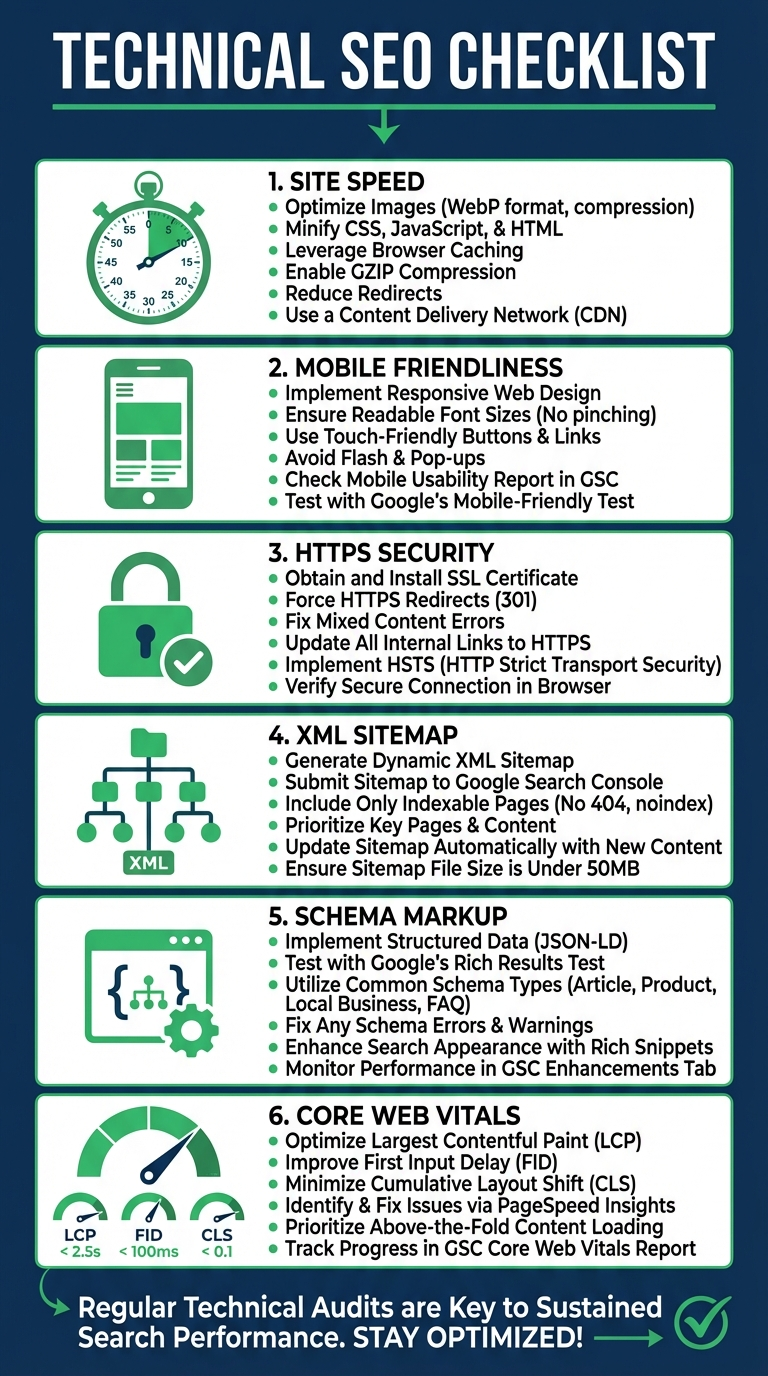
- Crawlability
- Check robots.txt for issues
- Verify XML sitemap is submitted and updated
- Review crawl stats in Search Console
- Indexation
- Check indexed page count
- Review index coverage report
- Address any indexing errors
- Site Speed
- Test Core Web Vitals
- Optimize images and code
- Check mobile and desktop performance
- Mobile Optimization
- Run Mobile-Friendly Test
- Check viewport configuration
- Test touch elements
- Security
- Verify HTTPS implementation
- Check for mixed content
- Review security headers
- Structured Data
- Implement relevant schema
- Test with Rich Results Test
- Monitor for errors
Tools for Technical SEO
Essential tools for your technical SEO toolkit:
- Google Search Console – Free, essential for any website owner
- Google PageSpeed Insights – Test and improve page speed
- Screaming Frog – Comprehensive site crawler
- GTmetrix – Detailed performance analysis
- Ahrefs/SEMrush – Technical audits and monitoring
- Schema Markup Validator – Test structured data
Conclusion
Technical SEO is the foundation of any successful online presence. For Philippine businesses looking to compete in an increasingly digital marketplace, addressing these technical elements isn’t optional—it’s essential for survival and growth.
Start by auditing your current technical setup using the checklist provided, prioritize the most critical issues (mobile optimization and Core Web Vitals), and systematically work through each element. Remember, technical SEO is an ongoing process, not a one-time task. Regular audits and updates will keep your website performing at its best.
If you need professional assistance with your technical SEO implementation, consider partnering with experts who understand the unique challenges and opportunities of the Philippine market.