Multi-Location Local SEO: How to Scale Pages Without Duplicates

If your business operates in more than one location, you’ve probably faced this dilemma: you need dedicated pages for each area you serve, but you’re terrified of creating a sea of duplicate content that tanks your rankings. You’re not alone. Multi-location local SEO is one of the trickiest scaling challenges in search, and getting it wrong can do more harm than good.
The good news? There’s a clear, repeatable framework for building location pages that Google actually rewards — pages that rank locally, serve real user intent, and don’t cannibalize each other. Let’s break it down.
Why Multi-Location SEO Matters More Than Ever
Local search isn’t slowing down. Google continues to refine how it surfaces results for “near me” queries and location-modified searches. According to Google’s own guidelines for Business Profiles, each distinct location should have its own presence — and that logic extends to your website, too.
For businesses with five, fifty, or five hundred locations, this creates a scaling problem. You can’t just spin up hundreds of pages with the same body copy and swap out the city name. Google’s algorithms are sophisticated enough to detect thin, templated content, and users are savvy enough to bounce when they land on a page that clearly wasn’t built for them.
The stakes are high. Done well, multi-location pages become powerful organic assets that drive foot traffic, phone calls, and conversions in every market you serve. Done poorly, they become an anchor dragging your entire domain down. If you’re serious about growth, investing in a sound SEO strategy for each location is non-negotiable.
The Duplicate Content Trap (and Why It’s So Easy to Fall Into)
Let’s be honest about why duplicates happen. It’s not laziness — it’s efficiency. When you’re managing dozens of locations, the temptation to create a template, fill in the blanks, and publish is enormous. The problem is that Google sees those pages as essentially the same piece of content. When that happens, you get:
Keyword cannibalization. Multiple pages compete for the same queries, and none of them rank well.
Crawl budget waste. Google spends resources indexing pages that add no unique value.
Poor user experience. Visitors land on generic pages that don’t answer their specific, location-based questions.
As Backlinko’s guide on multi-location SEO points out, the key differentiator between pages that rank and pages that don’t is genuine, location-specific value. That means going beyond a city name swap.

The Framework: How to Build Unique Location Pages at Scale
Scaling without duplicates requires a system. Here’s the framework we recommend — one that balances operational efficiency with the uniqueness Google demands.
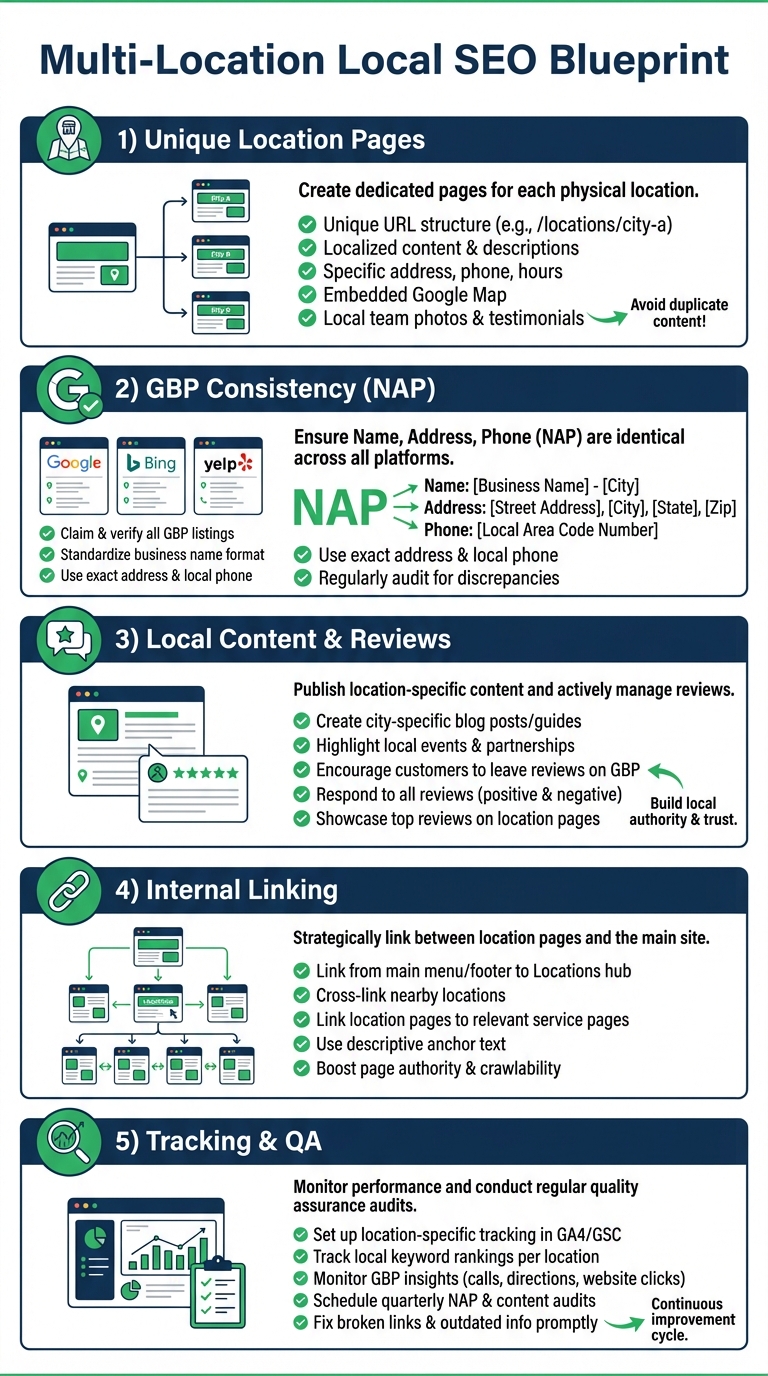
1. Start With a Strong, Flexible Template
Templates aren’t the enemy — bad templates are. Your location page template should include consistent structural elements (NAP data, maps, CTAs, service summaries) while leaving ample room for unique content blocks. Think of the template as scaffolding, not the finished building.
Every page should include: the full business name, address, and phone number for that location; embedded Google Map; location-specific hours of operation; and clear calls to action. These are your constants. Everything else should vary.
2. Layer in Genuinely Unique Content
This is where most businesses fall short. Unique content doesn’t mean rewriting the same paragraph in slightly different words. It means including information that is only relevant to that specific location. Consider adding:
Local team bios or staff introductions. Who works at this location? What’s their expertise?
Location-specific services or specialties. Does this branch offer something others don’t? Highlight it.
Neighborhood context. Mention nearby landmarks, parking information, public transit access, or the communities you serve from that location.
Customer reviews and testimonials. Pull in reviews specific to that location. This is one of the most powerful forms of unique, trust-building content you can add.
Local case studies or project highlights. If you completed notable work in that area, showcase it.
A strong content marketing approach makes this process systematic rather than ad hoc. When you plan content production around location-specific assets from the start, scaling becomes far more manageable.
3. Optimize Each Page for Local Search Intent
Each location page should target a distinct set of local keywords. That means your title tags, meta descriptions, H1s, and body copy should reflect the specific city, neighborhood, or service area — not just your brand name plus a generic service description.
For example, if you’re a dental practice with offices in Austin and San Antonio, your Austin page shouldn’t just say “Our Dental Services.” It should speak to dental care in Austin, reference the specific neighborhood, and address what Austin patients are actually searching for. Search Engine Land’s guide on service area pages offers excellent tactical advice on structuring these pages for maximum local visibility.

Don’t forget internal linking, either. Each location page should link to relevant service pages, blog content, and other location pages where it makes sense. This helps Google understand your site architecture and distributes authority across your domain. For more on how to structure your digital presence effectively, check out our roundup of internet marketing tips.
4. Use Schema Markup for Every Location
Structured data is your secret weapon for multi-location SEO. Implement LocalBusiness schema (or a more specific subtype) on each location page. This helps search engines parse your NAP data, business hours, service areas, and more — and it increases your chances of appearing in rich results and local packs.
Make sure each page’s schema reflects that specific location’s data. Don’t copy-paste the same JSON-LD block across all pages. That defeats the purpose entirely.
5. Align Your Google Business Profiles
Your website location pages and your Google Business Profiles should work in tandem. Each GBP listing should link to its corresponding location page — not your homepage. NAP consistency between your GBP and your website is critical for local ranking signals. As the