Meta Business Suite: Complete Guide for Filipino Marketers

If you manage a Facebook Page or Instagram account for your business, you’ve probably spent hours switching between apps, checking notifications, and trying to keep up with messages. Meta Business Suite changes all that by putting everything in one place.
This comprehensive guide covers everything Filipino marketers need to know about Meta Business Suite—from basic setup to advanced features that can transform how you manage your social media presence.
What is Meta Business Suite?
Meta Business Suite is Meta’s free, all-in-one platform for managing your Facebook and Instagram business accounts. It combines what used to be separate tools—Facebook Business Manager, Creator Studio, and Pages Manager—into a single, streamlined dashboard.
For Philippine businesses, this means you can manage your social media marketing efforts without constantly switching between apps or browser tabs.
The platform is available on desktop (business.facebook.com) and as a mobile app for iOS and Android. Whether you’re managing social media for a sari-sari store in Quezon City or a nationwide retail chain, the same tools are available to you.
Key Features of Meta Business Suite
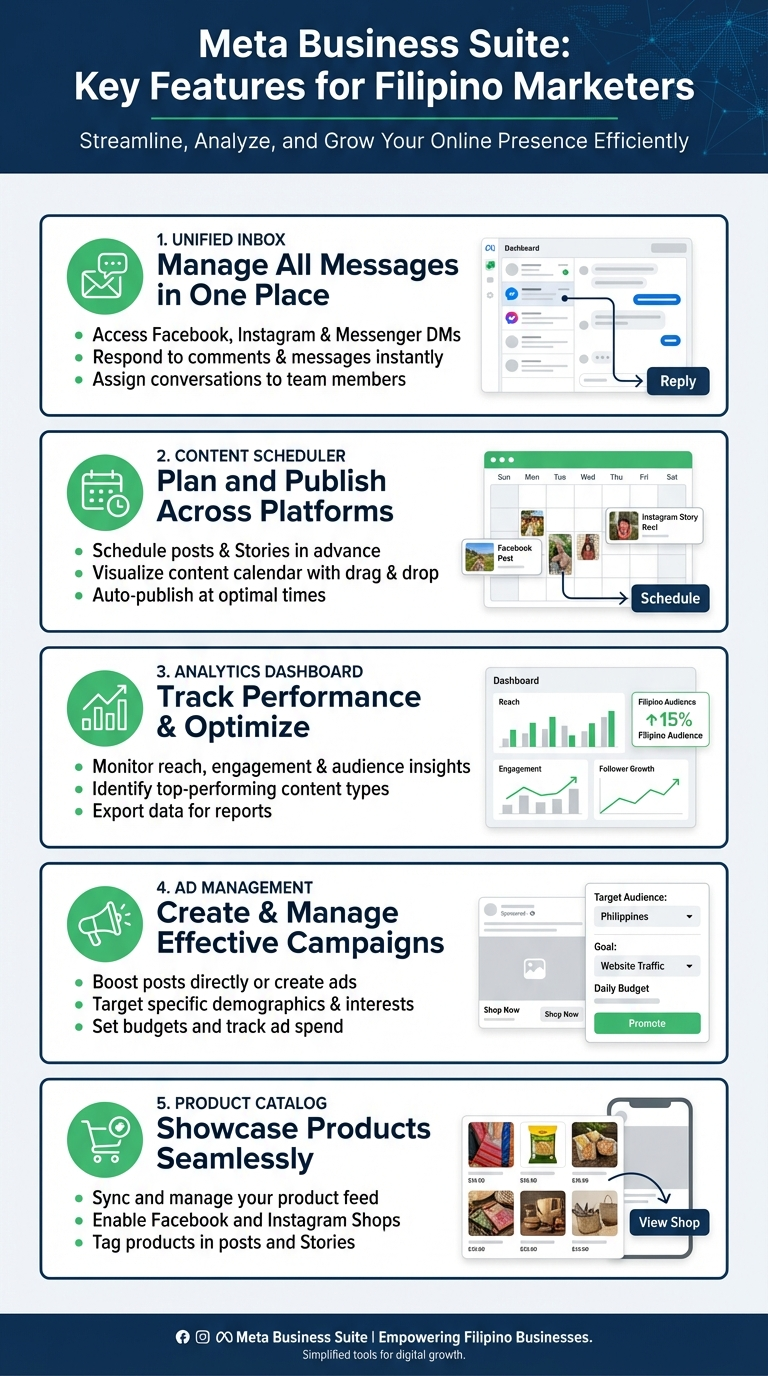
Meta Business Suite packs several powerful features that make social media management significantly easier. Here’s what you’ll actually use on a daily basis:
Unified Inbox
The unified inbox consolidates all your messages, comments, and notifications from both Facebook and Instagram into one view. Instead of checking two separate apps, you see everything in one place.
This is particularly valuable for Philippine businesses where customers often reach out through multiple channels. A customer might comment on your Instagram post, then send a Facebook message asking for prices—you’ll see both in the same inbox.
Features include:
- Message filtering by platform, read/unread status, or custom labels
- Automated responses for common questions
- Saved replies for frequently asked questions about products or services
- Team assignments so multiple staff can manage messages

Content Scheduler and Planner
The content planner lets you schedule posts for both Facebook and Instagram simultaneously. You can plan weeks or even months of content in advance, which is essential for maintaining a consistent posting schedule.
With the planner, you can:
- Schedule posts for optimal times (we’ve found that 9 AM to 12 PM Philippine time works well for many businesses)
- Cross-post to both platforms with customized captions for each
- View your content calendar in daily, weekly, or monthly views
- Draft posts and save them for later editing
For businesses following a social media calendar, this feature alone can save hours of work each week.
Insights and Analytics
Understanding what content performs best is crucial for improving your social media strategy. Meta Business Suite provides detailed analytics including:
- Reach and engagement metrics: See how many people viewed your posts and how they interacted
- Audience demographics: Understand who follows you—age, gender, location, and when they’re online
- Content performance: Compare different posts to see what resonates with your audience
- Page performance trends: Track growth over time
According to Statista, social media penetration in the Philippines reached 84.5% in 2024, making these analytics tools essential for reaching Filipino consumers effectively.
Ad Management
While Facebook Ads Manager remains the go-to tool for complex advertising campaigns, Meta Business Suite offers streamlined ad creation for basic campaigns. You can:
- Boost posts directly from your feed
- Create simple ad campaigns with guided setup
- Monitor ad performance alongside organic content
- Set budgets and targeting for local Philippine audiences
For more advanced Facebook advertising needs, you’ll want to use the full Ads Manager, but Meta Business Suite covers the basics well.
Setting Up Meta Business Suite
Getting started with Meta Business Suite is straightforward if you already have a Facebook Page. Here’s how to set it up:
Step 1: Access Meta Business Suite
Go to business.facebook.com and log in with your Facebook account. If you’re the admin of a Facebook Page, you should see it listed in your Business Suite dashboard.
Step 2: Connect Your Instagram Account
To manage Instagram from Business Suite:
- Go to Settings in the left menu
- Click on “Instagram account”
- Follow the prompts to connect your Instagram Business or Creator account
Note: You need an Instagram Business or Creator account—personal accounts can’t be connected to Meta Business Suite.
Step 3: Set Up Your Team (Optional)
If you have team members helping with social media:
- Go to Settings → People
- Click “Add People”
- Enter their email address and assign appropriate roles
Roles range from full admin access to limited access for specific tasks like responding to messages or creating content.
Step 4: Configure Notifications
Customize your notification settings so you don’t miss important messages or comments while avoiding notification overload. You can set different preferences for email, push notifications, and in-app alerts.
Best Practices for Filipino Marketers
Based on what works for businesses in the Philippine market, here are strategies to maximize Meta Business Suite:
Leverage the Mobile App
Filipinos are among the world’s most active mobile users. The Meta Business Suite mobile app lets you manage your accounts on the go—responding to messages during your commute or checking analytics while waiting for a meeting.
The app includes most desktop features, including:
- Full inbox access with quick replies
- Post creation and scheduling
- Basic insights and notifications
- Story creation tools
Use Automated Responses Wisely
Set up automated responses for common questions like store hours, location, or basic product inquiries. This is especially useful for businesses that receive high message volumes.
However, balance automation with personal touch—Filipino consumers generally prefer personalized service, so don’t automate everything. Use automation for initial responses and common FAQs, then follow up personally for complex inquiries.
Schedule Content for Peak Times
Use the scheduling feature to post when your audience is most active. For most Philippine businesses, this typically means:
- Facebook: 9 AM – 12 PM and 7 PM – 9 PM
- Instagram: 11 AM – 1 PM and 7 PM – 9 PM
Check your own Insights to find when your specific audience is online, as this varies by industry and target demographic.
Monitor Competitor Content
Meta Business Suite’s Insights includes a competitor benchmarking feature. Add similar businesses in your industry to see how your page performance compares. This helps identify content gaps and opportunities.
Advanced Features Worth Exploring
Meta Verified for Business
Meta now offers verification badges for businesses through a subscription service. While not free, this provides:
- A verified badge that builds credibility
- Priority customer support
- Account protection features
- Access to exclusive features
For businesses in the Philippines dealing with impersonation concerns or wanting to establish stronger credibility, this can be worth the investment.
Product Catalog Integration
If you sell products, connect your catalog to Meta Business Suite to:
- Tag products in posts and stories
- Enable Instagram Shopping
- Create dynamic ads that showcase your inventory
- Manage your catalog from one place
This feature has become increasingly important as more Filipino consumers shop directly through social media.
AI-Powered Recommendations
Meta Business Suite now includes AI-powered suggestions for improving your content strategy. These recommendations are based on your page’s performance data and industry benchmarks.
The AI might suggest:
- Optimal posting times based on your audience’s behavior
- Content types that typically perform well in your category
- Audience targeting improvements for boosted posts
Common Challenges and Solutions
Managing Multiple Pages
If you manage multiple business pages, Meta Business Suite lets you switch between them easily. Use the dropdown menu at the top of the screen to select different pages without logging in and out.
Team Coordination
For businesses with multiple team members managing social media:
- Use the assignment feature in the inbox to delegate messages
- Create saved replies that maintain consistent brand voice
- Set up notification preferences so the right people get alerted
- Review scheduled content together using the planner view
Learning the Interface
If you’re used to the old Facebook Business Manager or Creator Studio, the new interface might take some adjustment. Meta provides free online courses through Meta Blueprint that cover all Business Suite features.
Measuring Success with Meta Business Suite
Track these key metrics to measure your social media performance:
- Reach: How many unique users see your content
- Engagement rate: Interactions divided by reach
- Response time: How quickly you reply to messages
- Follower growth: Net new followers over time
- Click-through rate: For posts with links
For a deeper understanding of what metrics matter most, read our guide on tracking the right KPIs.
Final Thoughts
Meta Business Suite has evolved into a genuinely useful tool for managing Facebook and Instagram business accounts. For Philippine businesses—whether you’re a small local shop or a larger enterprise—it provides the essential features needed to maintain an effective social media presence.
The key is to start with the basics—unified inbox, scheduling, and insights—then gradually explore advanced features as your needs grow. Consistent use of these tools, combined with a solid social media strategy, can significantly improve your business’s online presence and customer engagement.
Take time to explore the platform, set up your team properly, and make the most of the analytics available. Your social media management will be more efficient, and you’ll have better insights into what actually works for your audience.