What is Googlebot Image and How It Works
Googlebot-Image is a dedicated crawler, separate from the primary Googlebot, that discovers and indexes visual content for Google Images. It identifies itself as “Googlebot-Image/1.0” in server logs and processes image files, alt text, and filenames independently from how the main crawler handles your page text and layout.
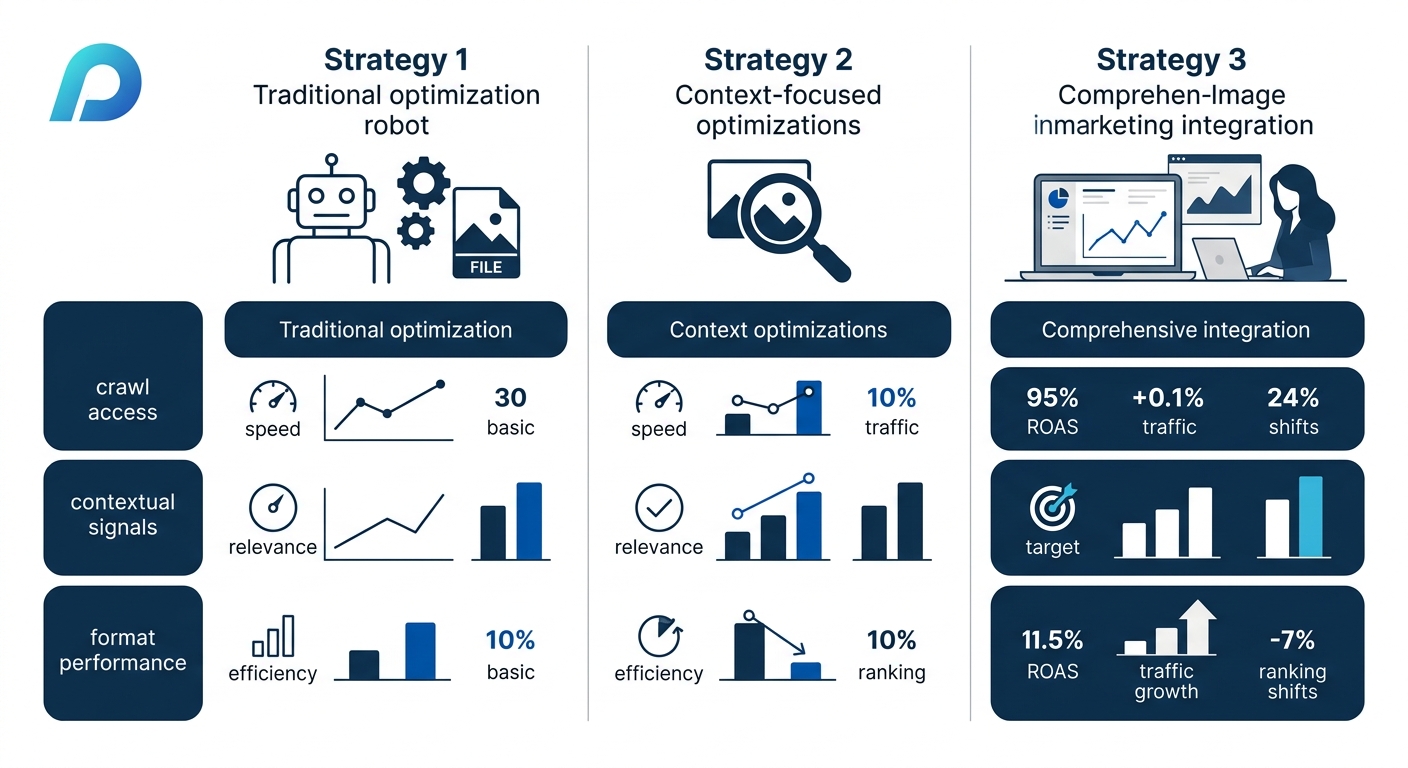
TL;DR: Googlebot-Image is a distinct user-agent from Google’s standard web crawler. Optimizing for it requires attention to three separate areas: crawl access (can the bot reach your images?), contextual signals (does the bot understand what the image depicts?), and format/performance (is the file efficient enough to justify crawling?). Most sites underperform in at least one.
Three distinct optimization strategies compete for your team’s attention when you’re briefing an agency on image SEO. Each targets a different stage of how Googlebot-Image processes your visual assets, and each carries real tradeoffs in implementation complexity, time-to-impact, and ongoing maintenance. The comparison below breaks down where each approach delivers the most value and where it falls short.
How Googlebot-Image Differs from Standard Googlebot
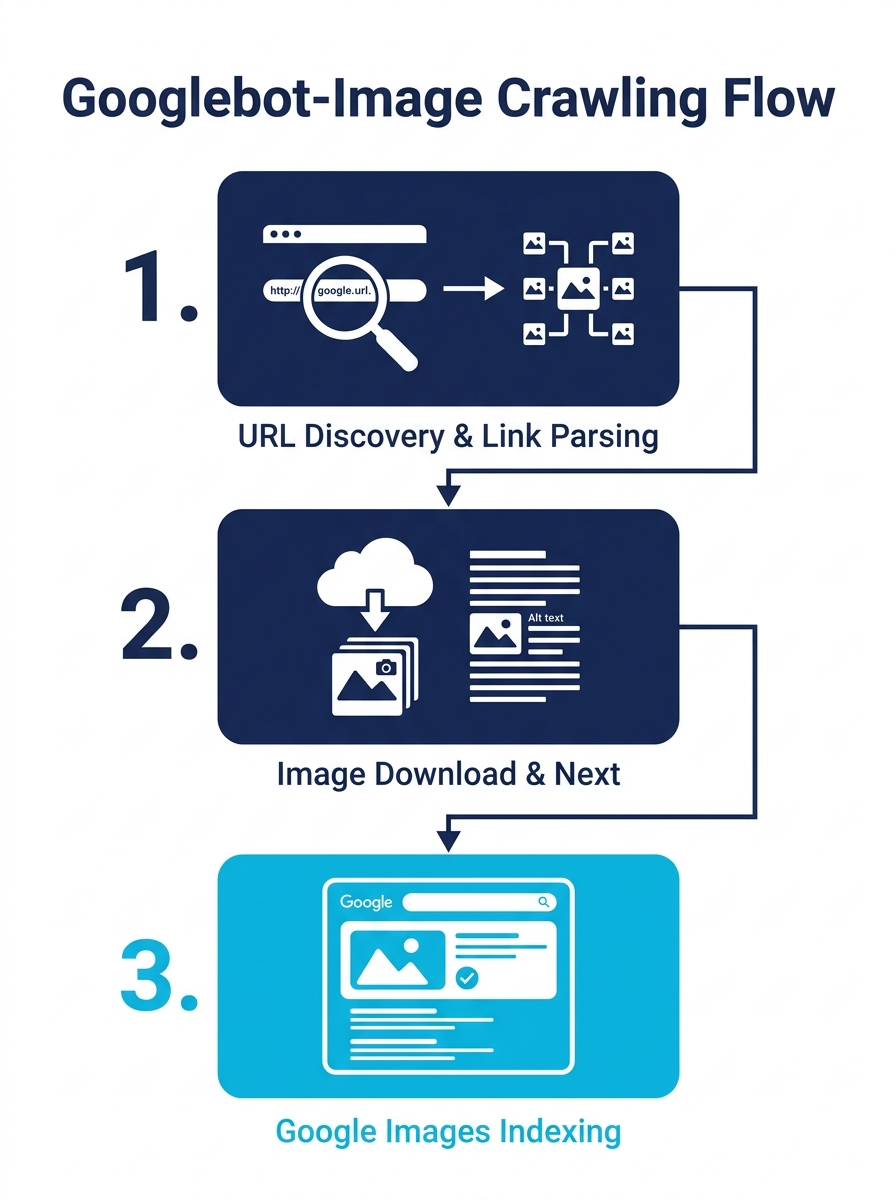
The Googlebot family was responsible for nearly 29% of all global bot crawl activity by 2024, according to industry crawl-traffic analyses. Within that family, Googlebot-Image operates as a specialized agent with a narrow mission: find image files, download them, and feed them into Google’s image indexing pipeline.
Standard Googlebot discovers new URLs primarily from links embedded in previously crawled pages. Googlebot-Image follows a similar discovery pattern but focuses on image URLs referenced in HTML img tags, CSS background images, and image sitemaps. When it visits your server, it logs as “Googlebot-Image/1.0” rather than the standard “Googlebot” string.
This distinction matters for one practical reason: you can control Googlebot-Image’s access independently. Your robots.txt file can block the image crawler while allowing the web crawler, or vice versa. If your robots.txt contains a “User-agent: Googlebot-Image” directive with a Disallow rule, Google’s web search results can still show your pages, but Google Images will not display your visuals.
When Google crawls images, it gathers terms from the image context and stores those terms in the indexing module to enable retrieval, as JC Chouinard’s research on Google Image Search documented. Google’s own developer documentation confirms that the indexing stage includes “processing and analyzing the textual content and key content tags and attributes, such as title elements and alt attributes, images, videos, and more.” This two-step process — crawl the file, then extract contextual meaning — defines the entire optimization challenge.
Understanding how crawl budget allocation works across your site architecture is essential background here. Every image Googlebot-Image downloads consumes a portion of the crawl budget Google assigns to your domain.
Crawl Access and Discovery Come First
Googlebot-Image can only index what it can reach. Blocked images, authentication walls, and missing sitemaps account for the most common and most avoidable image indexing failures.
The fundamentals are straightforward. Images must not be blocked by robots.txt rules targeting the Googlebot-Image user-agent. They must not sit behind login walls or require cookies to load. And they must be served with HTTP 200 status codes, not redirected through chains that burn crawl budget.
Image sitemaps accelerate discovery significantly. Google’s own documentation confirms that submitting an image sitemap can surface images the crawler would otherwise miss during standard HTML parsing. For enterprise sites with thousands of product images, this is where the gap between indexed and unindexed images often sits. A sitemap entry for each image URL, nested inside the corresponding page URL entry, tells Googlebot-Image exactly where to look without relying on link discovery alone.
To verify that a crawl request genuinely comes from Googlebot-Image (and not a scraper spoofing the user-agent string), run a two-step DNS lookup: the reverse DNS must resolve to a .googlebot.com domain, and the forward DNS must match the original IP address.
Where This Strategy Falls Short
Crawl access is necessary but insufficient. Ensuring Googlebot-Image can reach your images doesn’t tell the crawler what those images depict. A product catalog with 10,000 accessible but unlabeled images will be crawled, downloaded, and indexed with weak contextual signals. The images will show up in Google Images for broad, low-intent queries instead of the specific searches your buyers use.
This approach has the fastest implementation timeline — a robots.txt audit and sitemap submission can happen within a single sprint — but it produces the lowest ceiling for image search visibility on its own.
| Factor | Crawl Access Strategy | Context & Metadata Strategy | Format & Performance Strategy |
|---|---|---|---|
| Primary target | Bot reachability | Relevance signals | Crawl efficiency |
| Implementation speed | Days | Weeks | Weeks to months |
| Maintenance burden | Low | Medium (ongoing content) | Medium (format evolution) |
| Visibility ceiling | Low alone | High | Medium alone |
| Risk if neglected | Images invisible to Google | Images indexed for wrong queries | Slow LCP, wasted crawl budget |
| Best for | Sites with blocked or missing images | Content-rich and e-commerce sites | Large catalogs, image-heavy pages |
Making Metadata and Contextual Signals Work Harder
Google’s image indexing pipeline relies on surrounding page context more than the image file itself. Descriptive filenames, accurate alt text, captions, and the topic of the host page together form the primary relevance signal for image search rankings.
Google’s image SEO best practices documentation specifies that alt text should be descriptive and accurate, following W3C accessibility guidelines. For img elements, the alt attribute acts as the single strongest text signal Googlebot-Image receives. For inline SVG elements, the title element serves the same purpose. These aren’t optional enhancements. They’re the primary mechanism through which Googlebot-Image understands content.
Filename structure matters more than most marketing teams realize. An image file named “IMG_4392.jpg” provides zero contextual data. The same file renamed “red-running-shoe-nike-pegasus-side-view.jpg” gives Googlebot-Image five distinct terms to associate with the image before it even reads the surrounding HTML. Google’s indexing stage processes these filename terms alongside the page’s textual content.
The surrounding paragraph content also feeds into image relevance scoring. An image embedded within a detailed product description about trail running shoes will rank for trail-running-related image queries, even if the alt text only says “product photo.” But an image sitting in a generic template page with thin content will struggle to rank for anything specific.
This is where the overlap with broader SEO visibility debugging becomes clear. If your images rank for the wrong queries, the problem usually lives in the page-level content strategy, not the image files themselves.
Where This Strategy Falls Short
Metadata optimization requires ongoing content work. Every new product image, blog hero image, or infographic needs proper alt text, a descriptive filename, and placement within relevant page content. For enterprise sites publishing hundreds of new images monthly, this becomes a workflow and governance challenge. The quality of alt text tends to degrade over time unless there’s an explicit QA process baked into the publishing workflow.
The other limitation: perfect metadata can’t compensate for images that are too heavy to crawl efficiently or served in outdated formats. A 15 MB TIFF file with perfect alt text will still cause problems, because TIFF isn’t even in the supported format list.
Why Format and Compression Deserve Their Own Strategy
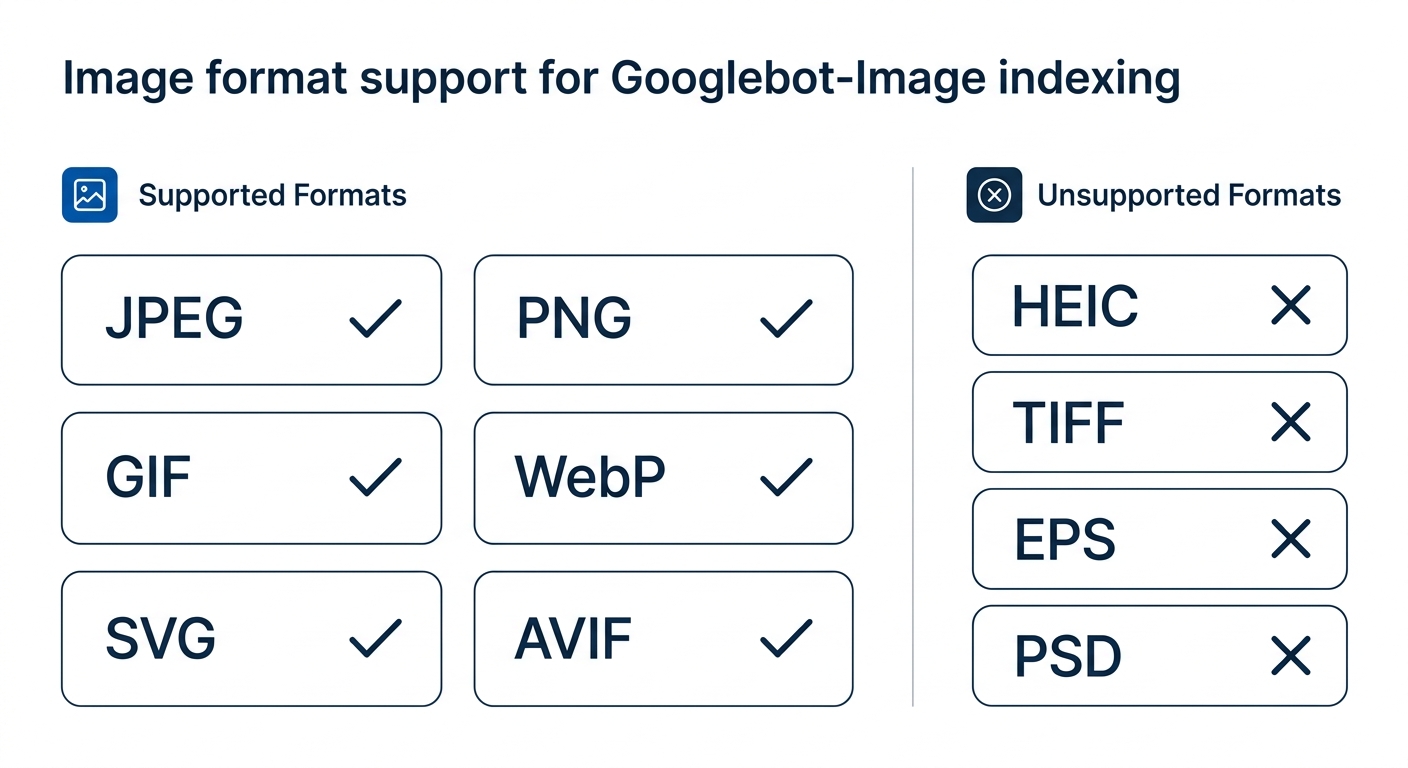
Image format choice and file size directly affect both crawl efficiency and Core Web Vitals scores. Google supports seven image formats for indexing: JPEG, PNG, GIF, WebP, SVG, BMP, and AVIF. AVIF was added to the supported format list in 2024, expanding options for sites seeking the best compression-to-quality ratio. Unsupported formats like HEIC, TIFF, EPS, PSD, and AI files will not be indexed by Googlebot-Image regardless of how well they’re optimized otherwise.
The global visual search market was valued at USD 26.92 billion in 2024 and is projected to reach USD 53.64 billion by 2033. That growth trajectory means image-heavy pages will face increasing competition for Google Images visibility, and the sites with the most efficient image delivery will command a crawl budget advantage.
Google’s crawl guidelines recommend keeping image files under 20 MB for crawling viability, but the practical target is under 3 MB for performance. Images should be at least 300 pixels wide, with 1,200 pixels recommended for key visuals that you want eligible for featured snippets and Knowledge Panels.
A hero image that loads slowly damages your Largest Contentful Paint (LCP) score, which is a confirmed Google ranking signal. And a page full of unoptimized images forces Googlebot to spend more crawl budget on a single page, reducing how many pages it can index per crawl cycle. Image performance directly affects image SEO through these two mechanisms: Core Web Vitals and crawl budget efficiency.
For enterprise brands evaluating how crawl budget gets distributed across their URL inventory, image weight is one of the most overlooked drains. A single product page with eight uncompressed images can consume the crawl budget equivalent of dozens of text-only pages.
Every image Googlebot-Image downloads consumes crawl budget. Unoptimized images don’t reduce page speed alone — they reduce how many of your other pages Google can index in the same crawl cycle.
Where This Strategy Falls Short
Format and compression work is technical debt reduction. It creates headroom for Googlebot-Image to work more efficiently, but it doesn’t add relevance signals. A perfectly compressed WebP image with no alt text and a generic filename will load fast and still rank poorly in image search.
The other challenge is format evolution. WebP was the clear winner for compression efficiency for years. AVIF now offers better compression at equivalent quality. But AVIF browser support, while growing, still doesn’t match WebP’s near-universal adoption. Teams need a format strategy that includes fallbacks, which adds complexity to the build and QA process.
How AI Changed Image Crawling
Googlebot-Image now employs AI-driven analysis and machine learning to recognize objects, faces, and text within images. This shifts the optimization equation. The crawler can partially “see” what an image contains, which means blatant keyword stuffing in alt text (describing a blue dress as a “red dress” to capture different queries) will increasingly backfire as the machine learning model detects the mismatch between visual content and text signals.
This development connects to broader shifts in how AI is reshaping search discovery. As Google’s visual understanding improves, the gap between what a page says about an image and what the image actually shows becomes a trust signal or a trust penalty.
For brands investing in conversion rate optimization alongside SEO, this has a practical implication: the images that perform best in search are increasingly the ones that accurately represent the product or content. Misleading thumbnails that drive clicks but generate bounces will lose ground to authentic product photography with honest metadata.
Tip: When auditing your site’s image SEO readiness, start by checking your server logs for “Googlebot-Image/1.0” user-agent hits. If the image crawler isn’t visiting your images at all, fix crawl access first. Metadata and format optimization only matter after the crawler can reach the files.
Who Should Pick Which
All three strategies work in sequence, not in competition. But resource constraints force prioritization, and the right starting point depends on your site’s current failure mode.
If Google Images shows zero results for your brand or product images, the problem is almost always crawl access. Check robots.txt, authentication requirements, and image sitemap coverage before spending time on alt text or format conversion.
If your images appear in Google Images but rank for irrelevant or broad queries, your site architecture and content signals need attention. Invest in descriptive filenames, accurate alt text, and stronger surrounding page content.
If your images appear and rank reasonably well, but your Core Web Vitals scores are suffering and your crawl stats show inefficiency, shift focus to format modernization and compression. Moving to WebP or AVIF with proper fallbacks will free up crawl budget and improve the user experience metrics that feed back into rankings.
Most enterprise sites carry problems in all three areas simultaneously. The value of the comparative framing is that it gives your team a diagnostic sequence: access first, then context, then performance. Fixing the gates, then the signals, then the efficiency produces compound returns. Each layer multiplies the value of the layers below it, and neglecting any one of them creates a ceiling the other two can’t break through.