Crawl Budget Waste in Enterprise Sites: Identifying and Eliminating Non-Revenue URLs Killing Your Organic Visibility

The standard enterprise response to crawl budget pressure is faster servers and cleaner sitemaps. The actual fix is deleting tens of thousands of URLs that Googlebot should never have seen in the first place, URLs generated by your own CMS, faceted navigation, internal search, and marketing tags that accumulate silently until they outnumber your revenue pages ten to one.
TL;DR: Enterprise crawl budget problems stem from URL bloat, not slow servers. Faceted navigation, internal UTM parameters, and mismanaged status codes generate tens of thousands of non-revenue URLs that crowd out the pages driving organic revenue. A non-indexable URL removal strategy focused on three layers — parameters, internal link signals, and status codes — consistently recovers crawl efficiency without infrastructure upgrades.
Google defines crawl budget through two variables: Crawl Capacity Limit (determined by server health and Googlebot’s own rate limits) and Crawl Demand (driven by URL popularity and freshness signals). As Conductor’s crawl budget reference guide explains, these two factors together determine how many pages Googlebot will request from your hostname in a given period. For sites under 10,000 pages, this rarely matters. For enterprise sites with 50,000, 200,000, or 2 million URLs, the math becomes punishing: every non-revenue URL that Googlebot crawls is a revenue URL it doesn’t.
The framework I’m proposing here — call it the Three-Layer Crawl Waste Audit — breaks the problem into the three distinct sources of crawl waste that consistently appear in enterprise technical SEO engagements: the Parameter Layer, the Signal Layer, and the Status Layer. Each requires different diagnostic tools and different fixes.
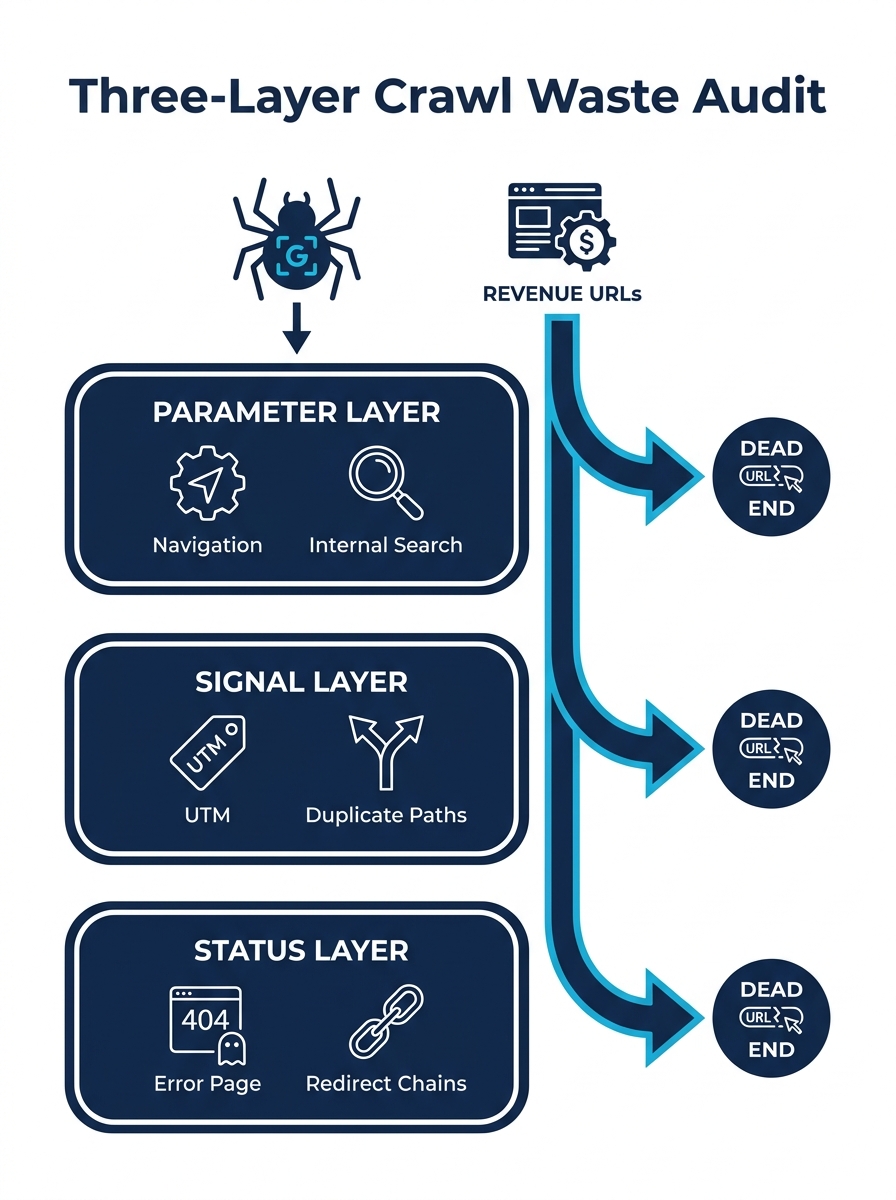
The Parameter Layer: Faceted Navigation and Internal Search Are Your Biggest Offenders
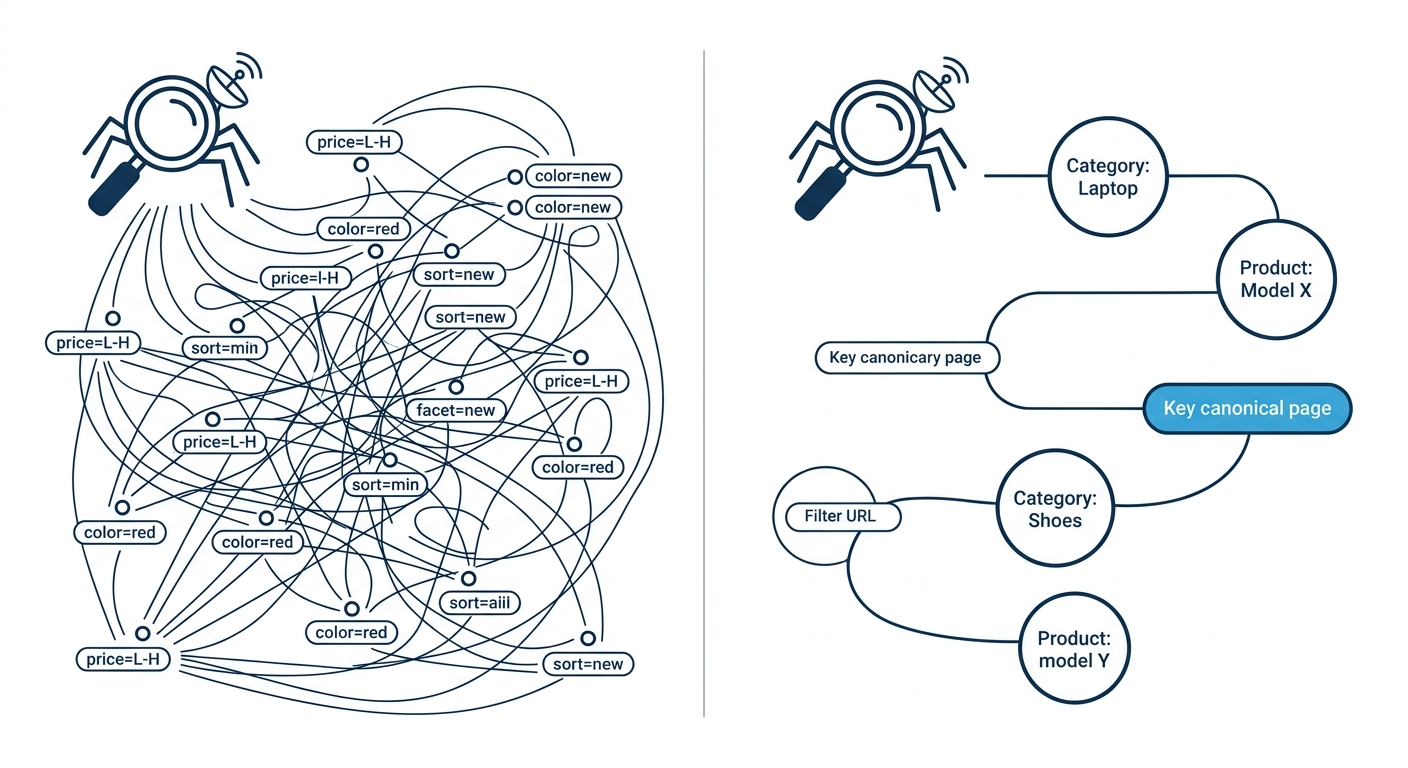
Faceted navigation on ecommerce and catalog sites generates URL permutations at a rate that no editorial team could ever match. A product category with 5 filter types and 8 options per filter produces 32,768 possible URL combinations from a single parent page. Multiply that across 40 category pages and you’ve created over 1.3 million crawlable URLs, almost none of which carry unique content or commercial intent.
Internal search parameter crawl waste follows the same pattern but is harder to spot. When Googlebot discovers a URL like /search?q=blue+shoes&page=3, it will attempt to crawl it. And if your internal search generates paginated results with crawlable links, Googlebot follows every page of every query it encounters. Semrush’s URL parameter guide puts it plainly: “If your site generates numerous URLs with parameters that lead to similar content, website crawlers might waste time on these variations instead of discovering new, unique content.”
A Search Engine Journal analysis of URL parameter handling found that these redundant parameter pages lead to keyword cannibalization and can downgrade Google’s assessment of overall site quality, since the additional URLs contribute no real value to the index.
One documented case study showed that blocking 340,000 monthly filter crawls on a single enterprise site reduced crawl waste by 73%, with the result that new product pages began indexing within hours rather than weeks. That’s the direct connection between crawl budget optimization and revenue: when Googlebot isn’t trapped in a maze of filter combinations, it finds your money pages faster.
The diagnostic step for a GSC crawl efficiency audit is straightforward. Export your crawl stats from Google Search Console, filter for URLs containing common parameter strings (?sort=, ?filter=, ?q=, ?page=, ?facet=), and calculate what percentage of total crawl requests those parameter URLs represent. On most enterprise sites we’ve examined, the answer falls between 40% and 70%. If your site architecture is already generating hundreds of unnecessary technical tickets, parameter sprawl is a reliable first place to look.
The fix combines robots.txt disallow rules for entire parameter classes, canonical tags pointing filtered variants back to the parent category, and — where your CMS supports it — rendering filter results via JavaScript that Googlebot won’t follow by default. The goal is to prevent Googlebot from burning crawl capacity on duplicate content that will never rank, while keeping the user-facing filter experience intact.
How Internal UTM Tags Silently Fracture Both Crawl Paths and Analytics Data
This is the one that surprises people. When your marketing team adds UTM parameters to internal links — typically for campaign tracking within analytics platforms — they create a parallel set of crawlable URLs for every page those links point to. A homepage banner linking to /products/summer-sale?utm_source=homepage&utm_medium=banner&utm_campaign=june2026 creates a URL that Googlebot treats as distinct from /products/summer-sale.
SEO consultant Elie Berreby documented this problem in detail, writing that “every millisecond a bot spends on redundant URL variations is a wasted opportunity which could prevent crawlers from discovering your most important URLs.” The crawl waste is bad enough on its own. But internal UTMs also fracture your analytics data because they overwrite the user’s original acquisition source when someone clicks an internal link tagged with UTM parameters. You lose both crawl efficiency and data accuracy in the same move.
A GSC crawl efficiency audit reveals this pattern quickly. Look for Googlebot requests to URLs containing utm_source, utm_medium, or utm_campaign where the base URL is an internal page. On sites with aggressive internal promotion — homepage carousels, sidebar CTAs, email signup flows that link internally — this category of waste can account for 15% to 25% of all crawl requests.
Warning: If your organization uses UTM parameters on internal navigation links, carousel banners, or sidebar CTAs, those tags are simultaneously corrupting your analytics attribution data and generating crawl waste. Audit your internal link inventory before your next campaign launch.
The fix is a firm organizational rule: UTM parameters belong on external links only. For internal campaign tracking, use event-based analytics (GA4 events, custom dimensions) or URL fragments (#) that Googlebot ignores. If UTM parameters are already deployed across your internal link structure, the immediate step is adding canonical tags to every affected page pointing to the clean, parameter-free version. This is one of those cases where site architecture decisions directly affect organic revenue, and the fix requires coordination between marketing and SEO teams rather than a purely technical deployment.
The Status Layer: Soft 404s and Redirect Chains That Refuse to Die
The third layer of crawl waste comes from URLs that no longer serve content but haven’t been properly retired. Soft 404s — pages that return a 200 status code but display a “page not found” message or an empty template — are particularly wasteful because Googlebot doesn’t know to stop crawling them. It requests the URL, receives a 200 response, downloads the full page, processes the content, determines it’s empty or duplicate, and moves on. All of that processing time could have gone to a revenue page.
Redirect chains create a similar drag. When URL A redirects to URL B, which redirects to URL C, which finally reaches URL D, Googlebot expends crawl capacity on each hop. Google will follow up to 5 redirects in a chain before giving up, but even 2-hop chains double the crawl cost of reaching the destination page. On enterprise sites that have survived multiple platform migrations, 3-hop and 4-hop redirect chains are common. We’ve written about how accumulated technical debt in information architecture compounds over time, and redirect chains are one of the most persistent forms of that debt.
The diagnostic process starts in Google Search Console’s Pages report, specifically the “Crawled – currently not indexed” and “Discovered – currently not indexed” categories. One practitioner guide recommends selecting 20 affected URLs — 10 important pages and 10 random — and inspecting them individually in GSC to reveal whether the pattern is caused by soft 404s, thin content, or canonical conflicts. Cross-referencing your 404 error exports against your internal link map identifies which broken URLs are still receiving link equity that goes nowhere.
A proper non-indexable URL removal strategy for the Status Layer involves three actions: returning genuine 404 or 410 status codes for permanently removed pages (410 signals more clearly that the content won’t return), collapsing redirect chains to single-hop 301s, and updating or removing internal links that point to dead or redirected URLs. The internal linking structure of your site should route equity only to live, indexable, revenue-relevant pages.
Every non-revenue URL that Googlebot crawls is a revenue URL it doesn’t.
Connecting Crawl Cleanup to Organic Revenue Outcomes
One legitimate criticism of enterprise technical SEO work is that it’s hard to draw a straight line to revenue. A discussion in Reddit’s r/bigseo community addressed this directly, with the consensus being: “If you can point to a timeline of what actions you took and when, and can correlate those actions to increases in traffic and conversions, you can make the case that the technical work you did on the website had a direct impact on revenue.” The argument is sound. The point of technical SEO isn’t to increase revenue through a single lever — it’s to remove the barriers that prevent your commercial pages from being found, indexed, and ranked.
The Three-Layer Crawl Waste Audit gives you a structured way to run that diagnostic and build the evidence trail. Parameter Layer waste shows up in GSC crawl stats filtered by URL patterns. Signal Layer waste appears in log file analysis and internal link audits. Status Layer waste surfaces in GSC’s indexing reports and server log response codes. Each layer produces a quantifiable before-and-after: number of non-revenue URLs crawled per day, percentage of crawl budget consumed by parameter variants, and median time-to-index for new product pages.
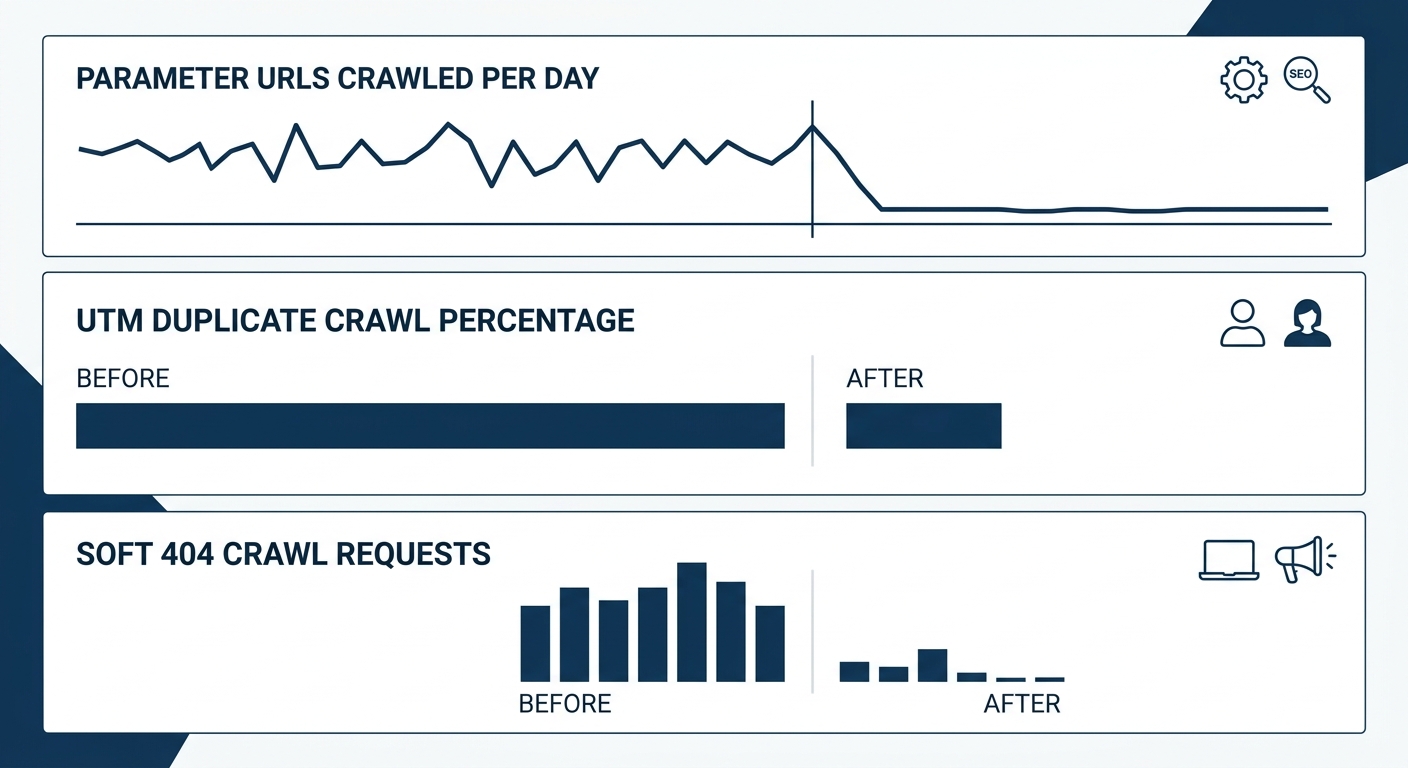
For enterprise sites where technical backlogs already number in the hundreds or thousands of tickets, crawl waste reduction is one of the highest-return items to prioritize because it compounds. Every URL you remove from Googlebot’s path frees capacity for every other URL on the site. And unlike content production or link building, the results of crawl cleanup tend to stabilize quickly. As one technical SEO guide notes, “you often see early signs within a few weeks as search engines re-crawl your site,” with major improvements becoming visible once Googlebot adjusts its patterns to the reduced URL count.
The Thesis, Compressed
The enterprise instinct when crawl budget becomes a problem is to scale infrastructure — faster servers, bigger CDN footprint, more aggressive sitemap submissions. That instinct treats crawl budget as a supply problem. The evidence consistently points in the other direction: it’s a demand problem, created by your own site generating more URLs than Googlebot should ever need to process. Faceted navigation, internal UTM tags, soft 404s, and redirect chains are the four mechanisms that inflate demand. Eliminating them is cheaper, faster, and more durable than any infrastructure upgrade. Server speed certainly matters — targeting response times below 500 milliseconds increases the number of pages crawled per session. But fast responses mean nothing if 60% of them are serving pages that will never appear in search results and never generate a peso of revenue. The Three-Layer Crawl Waste Audit won’t fix your content strategy or your backlink profile. What it will fix is the plumbing that determines whether Googlebot even reaches the pages where those strategies pay off.