The Technical SEO Triage System: Prioritizing Fixes When Your Site Has 50+ Issues

Run any enterprise site through a crawling tool and you’ll get back a report flagging 50, 80, sometimes 200+ issues. SE Ranking’s cross-site analysis found that 7.73% of websites have external JavaScript and CSS files returning redirect or error codes alone. That’s a single line item in what is typically a long, undifferentiated list. It sits next to missing alt text, orphaned pages, redirect chains, and dozens of other warnings, all presented with roughly equal visual weight. The result is predictable: teams freeze, pick issues at random, or start with whatever their developer finds easiest to fix.
This is the core problem with technical SEO audits. The tools are good at finding issues. They’re terrible at telling you which ones actually move rankings, traffic, or revenue.
Why Audit Reports Create Decision Paralysis
Audit tools assign severity labels (critical, warning, notice), but those labels reflect the tool vendor’s assumptions, not your site’s business context. A “critical” flag for duplicate title tags on 30 blog posts is qualitatively different from a “critical” flag for noindex directives accidentally deployed on your product category pages.
Aira’s 2026 State of Technical SEO Report found that 67% of in-house SEO teams cite lack of developer bandwidth as the top barrier to implementing technical fixes. When dev time is scarce and the audit report is 15 pages long, the path of least resistance is to tackle low-effort items first: meta description tweaks, image alt tags, minor redirect updates. Those feel productive. They close tickets. They rarely move any metric that matters.
The smarter approach requires a technical SEO prioritization framework that separates what blocks performance from what merely looks untidy.
A Two-Axis Triage That Sorts 50+ Issues Into Four Buckets
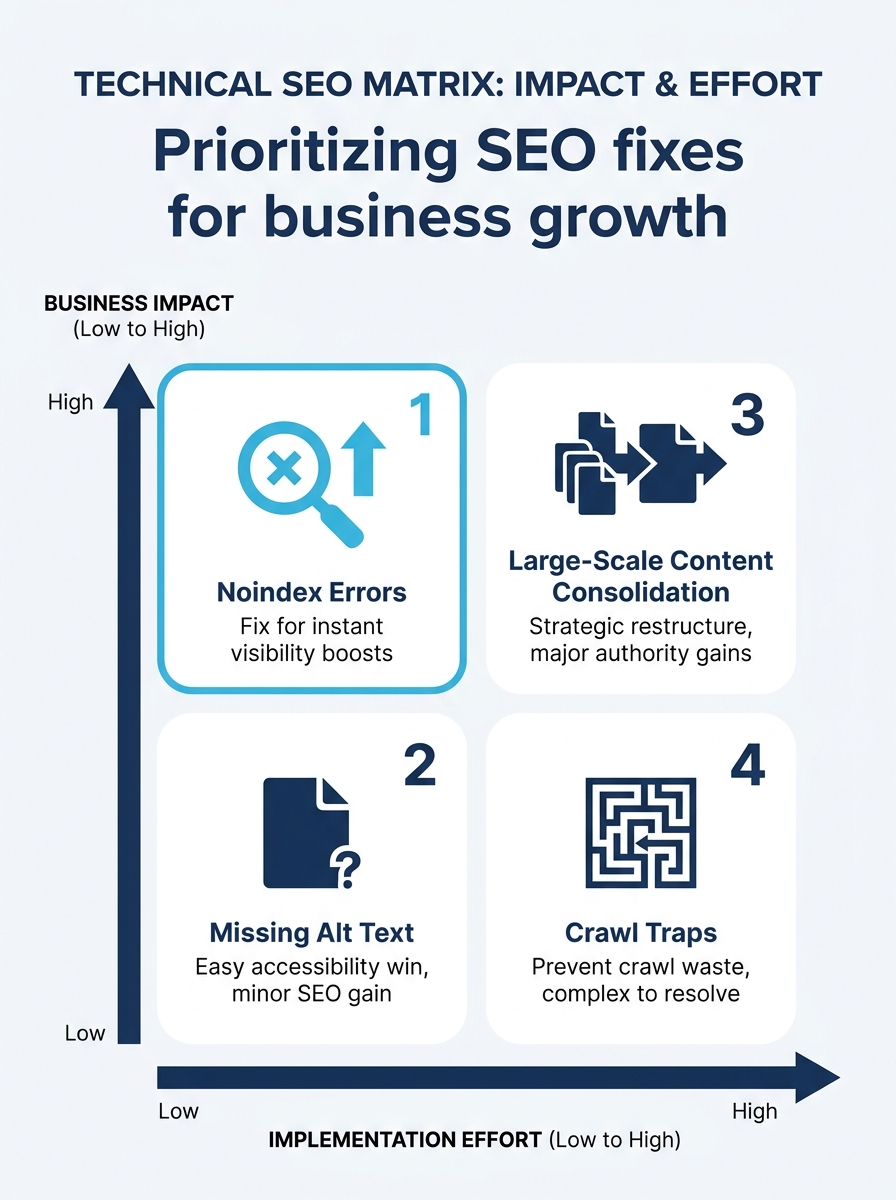
The framework most experienced SEO consultants converge on is a variation of impact-versus-effort scoring. As one practitioner summarized: high impact and low effort first, high impact and high effort next, quick wins after that, and low-impact chores only if you’re already in the area.
Here’s how to apply that thinking when your audit surfaces 50 or more issues.
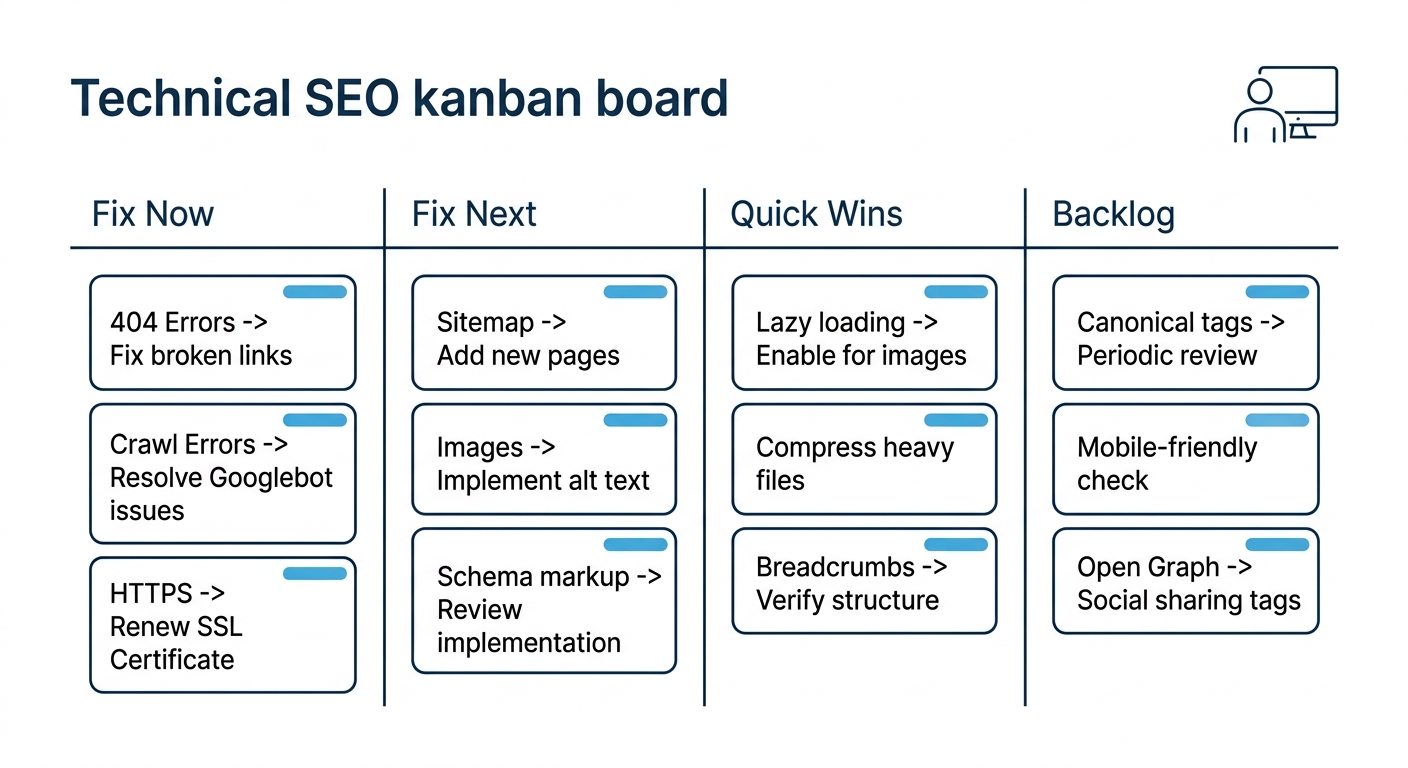
Bucket 1: Fix Now (High Impact, Low-to-Medium Effort)
These are problems that block indexing, break user journeys, or suppress ranking eligibility for high-value pages:
- Accidental noindex tags on production pages. A single line of code can make an entire subdirectory invisible to Google. This is the SEO equivalent of a fire alarm.
- Widespread 5xx server errors. Pages returning server errors can’t be crawled, can’t be indexed, and can’t convert anyone. If your server intermittently fails under load, Google’s own crawl budget documentation recommends adding server resources as a first step.
- Expired SSL certificates or mixed content on transactional pages. Security warnings destroy trust signals and may trigger browser interstitials that kill conversion entirely.
- Broken checkout or lead-form flows. This isn’t strictly an SEO problem, but if your conversion rate optimization depends on users completing a journey that’s technically broken, no amount of ranking improvement matters.
Bucket 2: Fix Next (High Impact, Higher Effort)
These require coordination between SEO, development, and sometimes infrastructure teams, but they produce meaningful, sustained improvements:
- Core Web Vitals failures. Fewer than one in three websites pass Google’s Core Web Vitals assessment. For Philippine e-commerce brands in particular, we’ve written about why CWV performance still drives measurable ranking differences. Fixing LCP, CLS, and INP on key landing pages and product templates typically takes weeks of dev work, but the competitive advantage in APAC markets is real because many competitors haven’t bothered.
- Canonicalization conflicts across large page sets. When hundreds of near-duplicate pages send conflicting canonical signals, Google has to guess which version to index. It often guesses wrong. Consolidation requires careful mapping before any tags get changed.
- Mobile usability failures on high-traffic templates. With over half of global web traffic coming from mobile, and that share skewing higher in the Philippines, template-level mobile rendering issues compound across every page using that template.
Bucket 3: Quick Wins (Lower Impact, Low Effort)
- Missing or generic meta descriptions on important pages
- Image alt text gaps on product or service pages
- Minor redirect chains (two hops, not blocking key flows)
- Schema markup additions on pages already ranking well
These aren’t urgent. They won’t rescue a site that’s hemorrhaging traffic. But they’re low-cost improvements that your team can batch into a single sprint when bandwidth opens up.
Bucket 4: Backlog (Low Impact, High Effort)
- Cleaning up every orphaned blog post from 2018
- Fixing text-to-HTML ratios (which, as one 2026 guide on SEO audit interpretation notes, don’t actually impact rankings)
- Obsessing over multiple H1 tags, another myth that audit tools perpetuate
- Rewriting URLs purely for “prettiness” without redirect mapping
These items consume dev hours for negligible search performance gains. If your team is tackling Bucket 4 while Bucket 1 items remain open, the enterprise SEO workflow has a prioritization problem, not a resources problem.
Why Crawl Budget Optimization Hits APAC Enterprise Sites Harder
For sites with a few hundred pages, crawl budget rarely matters. Google will get to everything. But enterprise sites in the APAC region—large e-commerce catalogs, multi-language portals, regional news properties—frequently run into crawl budget ceilings that suppress indexation of their most valuable pages.
The mechanics are straightforward: Googlebot allocates a finite number of crawl requests per site per day. When a significant portion of those requests get spent on parameter URLs, faceted navigation pages, internal search results, or soft-error pages, the URLs that actually need to be indexed get crawled less frequently or not at all.
ALM Corp’s technical framework for enterprise crawl budget optimization identifies log file analysis as the starting point. You need to see where Googlebot is actually spending its time before you can redirect that attention. For APAC enterprise brands running product catalogs in the tens of thousands of URLs, crawl budget optimization across APAC markets often means aggressive use of robots.txt to block faceted navigation, cleaning up parameter-based URL variants, and ensuring XML sitemaps only contain indexable, canonical URLs.
When dev time is scarce and the audit report runs 15 pages, the path of least resistance is to tackle low-effort items first. Those feel productive. They close tickets. They rarely move any metric that matters.
If you’re working with an enterprise digital marketing partner on a site with thousands of pages, ask them to show you Googlebot’s actual crawl distribution from server logs. When more than a third of crawl requests hit non-indexable URLs, crawl budget waste becomes a Bucket 1 problem, regardless of what the audit tool’s severity label says.
Getting Audit Findings Into Dev Tickets That Won’t Sit Untouched
The 67% developer-bandwidth statistic from Aira’s report deserves closer examination. Part of the problem is genuine resource scarcity: dev teams have feature roadmaps, bug queues, and product launches competing for the same sprint capacity. But part of it is communication failure. SEO teams hand over audit exports (spreadsheets with hundreds of rows, cryptic error codes, and no business context) and then wonder why the tickets sit untouched for months.
An SEO audit triage system that works in practice requires translating each finding into a format that respects how dev teams operate:
- Issue description in plain language. “Googlebot can’t render the product grid because a third-party JavaScript file returns a 404” is actionable. “External JS 4xx error” is not.
- Priority tier (Bucket 1 through 4) with a one-sentence explanation of business impact. “This blocks indexation of our highest-revenue product category” gives a product manager something to weigh against other priorities.
- Example URLs, at least three, ideally with screenshots or rendered-page comparisons showing the problem in context.
- Proposed fix, even if approximate. Dev teams move faster when they have a starting hypothesis rather than an open-ended investigation.
Tip: When filing SEO-related dev tickets, always include a “business impact” field. A single sentence like “affects indexation of pages responsible for our top product category” gives the product owner enough to triage against non-SEO work.
This kind of structured handoff is where the relationship between your SEO team and your development team either produces results or drifts into a backlog graveyard. We’ve covered the broader monitoring architecture that catches visibility drops before they compound. But detection without a clear handoff process just generates alerts no one acts on.
How Long Before Fixes Show Up in Search Console
One of the most common questions marketing leaders ask after approving a round of technical fixes: “When do we see results?” The answer depends entirely on which bucket the fix falls into.
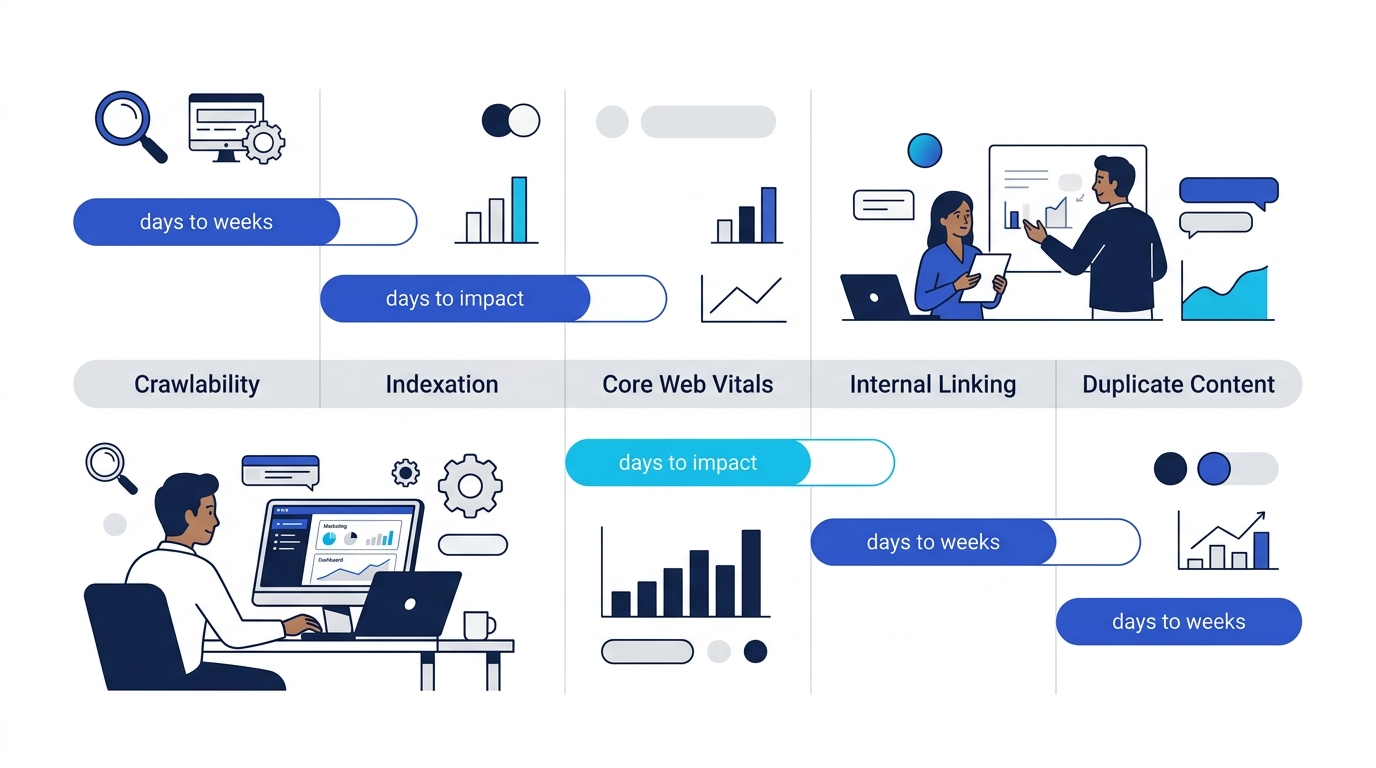
- Crawlability fixes (robots.txt corrections, 4xx/5xx error resolution): 3 to 14 days. Googlebot picks these up relatively quickly, especially if you request re-crawl through Search Console.
- Indexation fixes (canonical tag corrections, sitemap cleanup): 1 to 4 weeks. Google needs to re-process affected URLs and decide whether to add or remove them from its index.
- Core Web Vitals improvements: 2 to 6 weeks. CrUX data updates on a 28-day rolling window, so even perfect fixes won’t reflect in PageSpeed Insights or Search Console’s CWV report for about a month.
- Internal linking restructuring: 4 to 8 weeks. Changes to link equity distribution take time to propagate through Google’s understanding of your site’s hierarchy.
- Large-scale duplicate content consolidation: 6 to 12 weeks. This is among the slowest to show results because it requires Google to re-evaluate which URLs deserve to rank and redistribute signals accordingly.
These timelines matter when reframing SEO strategy around revenue outcomes rather than vanity metrics. If your leadership team expects a traffic bump within days of deploying a round of canonical tag fixes, you need to set expectations before the work begins, not after.
E-Commerce Sites Face a Compounding Version of This Problem
E-commerce sites in the Philippines face a particular version of the triage challenge. Product catalogs generate thousands of URLs through color variants, size options, and filtered navigation pages. Each of those URLs can trigger its own set of audit warnings: duplicate content, thin content, missing canonical tags, crawl trap potential.
The triage principle stays the same, but the scale changes the math. Fixing a canonical tag issue on a single blog post is a Bucket 3 task. Fixing the same canonical tag logic across a template that generates 8,000 product variation pages is firmly Bucket 2, because the aggregate impact on crawl budget and index quality is significant. Your technical SEO audit process needs to distinguish between instance-level issues and template-level issues. Template fixes are almost always higher priority because they resolve hundreds or thousands of individual warnings at once. Brands investing in product-page SEO at scale should pressure-test their triage against this template-versus-instance distinction early.
What the Audit Data Alone Can’t Tell You
Every triage framework has a blind spot: the numbers describe what’s broken, but they can’t tell you what matters most to your business. A page returning a 5xx error is objectively a critical issue. But if that page gets 12 visits per month and contributes nothing to revenue, it’s a lower priority than a subtle CLS shift on your highest-converting landing page.
Audit tools will keep getting better at detection. SE Ranking, Screaming Frog, Sitebulb, and seoClarity all surface more issues with each major release. The gap between detection capability and prioritization judgment keeps widening. A crawling tool can’t know that your Philippines market expansion depends on 40 new regional landing pages going live next quarter, or that your CTO just committed the dev team to a platform migration that will invalidate half the current audit findings.
Triage is ultimately a judgment call. The two-axis model gives you a shared language between SEO, dev, and leadership. The bucket system gives you a sequencing logic that prevents wasted sprints. But the final ranking of priorities has to come from someone who understands the business context: what pages drive revenue, what launches are coming, and what the competitive landscape looks like in your specific market segment. Audit tools generate the raw material. They don’t generate the strategy.