Email Deliverability Checklist for 2026 (Inbox Placement + Spam Control)
Why Email Deliverability Matters More Than Ever in 2026
You could have the most compelling email copy in the world, but if it never reaches the inbox, it’s worthless. That’s the cold, hard truth about email marketing in 2026. Deliverability isn’t just a technical checkbox—it’s the foundation that determines whether your campaigns generate revenue or vanish into spam folders.
Over the past two years, major inbox providers have dramatically tightened their filtering standards. Google, for instance, rolled out strict sender requirements that now affect every business sending bulk email. If you’re not meeting those requirements, your messages are being quietly throttled, bounced, or buried.
The good news? Deliverability is entirely within your control. With the right strategy, you can consistently land in the primary inbox, keep spam complaints near zero, and protect your sender reputation for the long haul. This guide gives you a comprehensive checklist to make that happen.
Understanding the 2026 Deliverability Landscape
Let’s set the stage. The email ecosystem has shifted significantly, and what worked even two years ago may now be hurting your placement rates. Here’s what’s changed:
Authentication is non-negotiable. Inbox providers now require full authentication—SPF, DKIM, and DMARC—for all senders. Google’s authentication guidelines make it clear: if you’re not properly authenticated, your emails will be rejected or flagged. This isn’t optional anymore. It’s table stakes.
Engagement signals drive placement. Algorithms now weigh recipient behavior more heavily than ever. Opens, clicks, replies, and time spent reading all factor into whether your next email lands in the inbox or the promotions tab. Low engagement tells providers your content isn’t wanted—and they’ll act accordingly.
Spam complaint thresholds are razor-thin. Google has publicly stated that senders should keep their spam complaint rate below 0.3%, with a recommended target well under 0.1%. Exceed that threshold consistently, and your domain reputation takes a serious hit.
If you’ve been keeping up with the latest digital marketing trends, none of this should come as a surprise. But knowing the landscape and actually executing on it are two different things. That’s where the checklist comes in.
Metrics That Signal Deliverability Risk
Deliverability problems show up in your metrics before they show up in revenue. Watch your hard bounce rate, spam complaint rate, and the percentage of emails that never generate an open. If those numbers trend the wrong way, don’t wait. Small issues become provider‑level reputation problems fast.
You should also monitor inbox placement by list quality and acquisition source. A list acquired from a webinar can behave very differently from a list acquired through a discount pop‑up. The difference isn’t just engagement—it’s how mailbox providers judge the overall quality of your domain.
Tie these metrics to downstream conversions. If inbox placement drops, your conversion rate optimization work has less data to work with, and your testing cycles get noisier. Deliverability is the foundation; everything else sits on top.
Deliverability Checklist for 2026
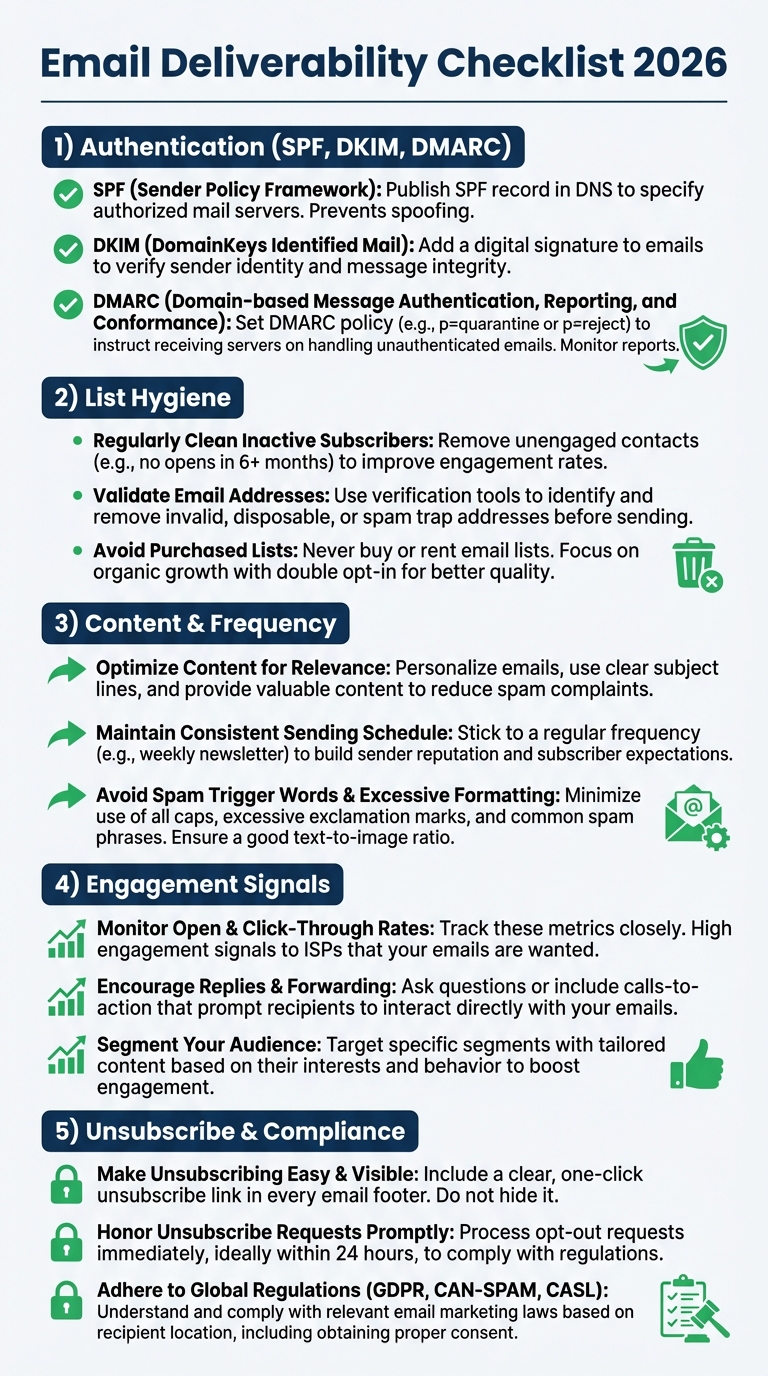
Use this checklist as your operational guide. Whether you’re auditing an existing program or building one from scratch, every item here directly impacts your inbox placement and spam control.
1. Authenticate your sending domain with SPF, DKIM, and DMARC.
This is the single most important technical step you can take. SPF tells inbox providers which servers are authorized to send on your behalf. DKIM adds a cryptographic signature to verify your messages haven’t been tampered with. DMARC ties them together and tells providers what to do when authentication fails. Google’s sender authentication documentation outlines the exact records you need in place. If you haven’t configured all three, stop everything and do it now.
2. Align your “From” domain with your authentication records.
Domain alignment means the domain in your “From” address matches the domains in your SPF and DKIM records. Misalignment is a red flag for spam filters and can cause DMARC to fail even when SPF and DKIM individually pass. Audit this quarterly.
3. Set up a DMARC policy and monitor reports.
Start with a “none” policy if you’re new to DMARC, then gradually move to “quarantine” and eventually “reject” as you gain confidence in your authentication setup. Review DMARC aggregate reports regularly to catch unauthorized senders using your domain.
4. Maintain a clean, permission-based email list.
Never purchase email lists. Ever. Every address on your list should have explicitly opted in. Use confirmed opt-in (double opt-in) whenever possible. This single practice eliminates a massive percentage of deliverability problems before they start.
5. Implement a sunset policy for inactive subscribers.
If someone hasn’t opened or clicked an email in 90 to 120 days, move them to a re-engagement group. If they still don’t respond after a dedicated win-back campaign, remove them. Sending to unengaged contacts drags down your domain reputation and signals to providers that your content isn’t valued.
6. Keep spam complaint rates below 0.1%.
Monitor your complaint rates through feedback loops and postmaster dashboards. Google recommends staying well below the 0.3% threshold, but best-in-class senders target under 0.1%. If your rates spike, immediately investigate your most recent sends for content issues, list quality problems, or frequency complaints.
7. Include a visible, one-click unsubscribe mechanism.
This is now a hard requirement from major inbox providers. Google’s unsubscribe guidelines mandate that bulk senders support one-click unsubscribe via a List-Unsubscribe header. Don’t bury your unsubscribe link. Don’t make people log in to manage preferences. Make it effortless. A clean unsubscribe is infinitely better than a spam complaint.
8. Warm up new sending domains and IP addresses gradually.
If you’re launching a new domain or migrating to a new sending infrastructure, don’t blast your full list on day one. Start with your most engaged subscribers and slowly increase volume over two to four weeks. This builds a positive reputation with inbox providers from the start.
9. Group your audience and personalize your content.
Groupation isn’t just a marketing best practice—it’s a deliverability strategy. Sending relevant content to targeted groups drives higher engagement, which in turn improves your sender reputation. A strong content marketing strategy ensures you always have valuable material to share with each group.
10. Optimize your email content for inbox placement.
Avoid spam trigger words, excessive capitalization, and misleading subject lines. Keep your text-to-image ratio balanced. Use alt text on images. Ensure your HTML is clean and renders properly across devices. Test every email before sending.
11. Monitor your sender reputation continuously.
Check your domain and IP reputation through postmaster tools provided by major inbox providers. Track bounce rates, complaint rates, and placement rates over time. A sudden dip in any metric is an early warning sign that needs immediate attention.
12. Test deliverability before major campaigns.
Send test emails to seed accounts across multiple inbox providers before launching to your full list. This lets you catch placement issues, rendering problems, and spam filter triggers before they affect your real audience.
Beyond the Checklist: Building a Sustainable Email Program
Checking every box on this list is essential, but sustainable deliverability requires an ongoing commitment. Think of it as reputation management—every email you send either builds or erodes trust with inbox providers.
One of the most overlooked aspects is how email fits into your broader digital strategy. Your SEO efforts drive organic traffic to your site, where visitors opt into your list. Your landing pages—optimized through conversion rate optimization—determine the quality of those opt-ins. And your email program nurtures those subscribers into customers. When these channels work together, deliverability improves naturally because you’re attracting the right people and sending them content they actually want.
It’s also worth reviewing how you’re using different digital marketing platforms to support your email program. Cross-channel consistency in messaging and branding builds subscriber trust, which translates directly into higher engagement and fewer complaints.
Common Deliverability Mistakes to Avoid
Ignoring bounce management. Hard bounces should be removed immediately. Soft bounces should be monitored and suppressed after repeated failures. Continuing to send to invalid addresses damages your reputation fast.
Sending too frequently without value. There’s no universal “right” frequency, but there is a wrong one: any frequency where your content doesn’t justify the send. If subscribers start ignoring your emails, providers notice. Respect your audience’s attention.
Using a shared sending domain without monitoring. If you’re on shared infrastructure, other senders’ behavior can affect your deliverability. Monitor your placement rates closely, and consider moving to a dedicated sending domain as your program scales.
Negl
How to Reset After a Deliverability Dip
If you hit a spike in spam complaints or a sharp drop in opens, don’t panic. First, pause your most aggressive campaigns and send to your most engaged group only. That stabilizes your reputation while you diagnose the root cause.
Next, review authentication, unsubscribe placement, and your most recent subject lines. One bad send can poison a domain for weeks. The fastest recovery is a controlled re‑warm with high‑engagement subscribers, then a gradual expansion back to normal volume.