Technical SEO for Developer Communities: Building Trust Through Code Quality Over Keywords

Developer documentation sites running versioned API references carry a specific organic visibility problem that no keyword strategy will fix: each version of a docs page shares nearly all its content with every other version, creating dozens of near-duplicate URLs competing for identical queries. Redocly’s SEO best practices guide for documentation documents this failure mode in clinical detail, and the prescribed fix reads like an engineering ticket, not a marketing brief. Canonical tags. Server-side rendering decisions. Information architecture changes that require pull requests, not spreadsheet edits. The developer communities that treat technical SEO for developers as an engineering discipline are the ones building durable organic traffic. The ones that treat it as a marketing add-on keep watching their docs pages cannibalize each other in search results.
This is a dissection of how that plays out, using documented patterns from developer documentation platforms as a case in code quality SEO done right and done wrong.
The Versioning Trap in API Documentation
When a developer documentation site publishes API references for multiple product versions, the naive approach is to give each version its own URL path. Version 3.2 of an endpoint reference lives at /docs/v3.2/authentication, version 3.1 lives at /docs/v3.1/authentication, and so on backward through every release. The content across these pages is often 90% identical. Maybe a parameter changed, maybe a response field was deprecated, but the bulk of the page—descriptions, examples, error codes—is the same.
Search engines see these as near-duplicates. Without explicit canonical signals, Googlebot has to guess which version deserves to rank. Sometimes it picks the wrong one. Sometimes it picks none of them, because the accumulated duplication lowers the perceived quality of the entire docs subdomain.
Redocly’s documentation identifies the canonical tag as the first-line fix: every versioned page should declare the “latest” stable version as the canonical URL. But the implementation requires engineering judgment. If your docs are generated from a build pipeline (and nearly all modern API documentation is), the canonical tag needs to be injected at build time, pointing to a consistent URL pattern that persists across deployments. This is a code decision, not a content decision.
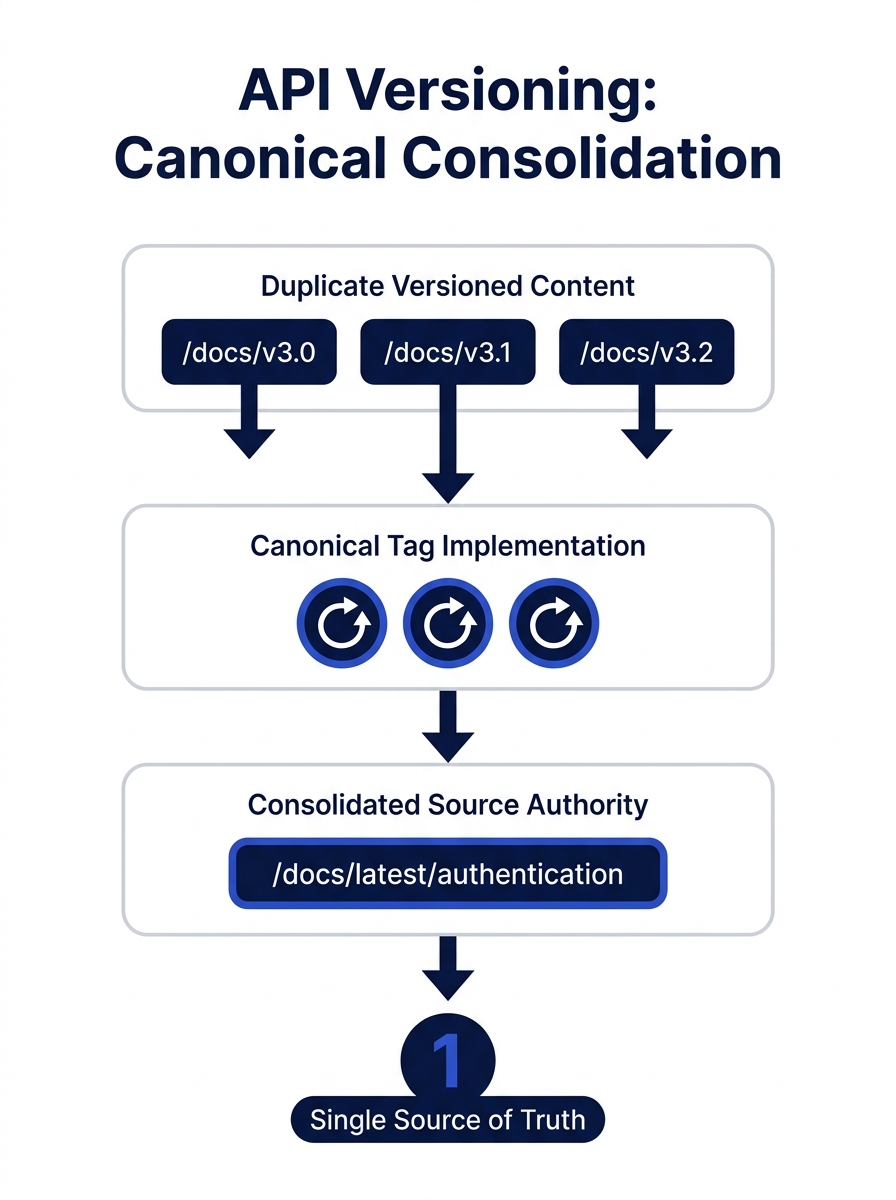
The r/technicalwriting community on Reddit put it bluntly in a technical SEO checklist thread: H1 and H2 tags should “scream what the page is about.” When versioned pages share identical headings, they scream the same thing. The heading structure itself becomes a duplication signal. Developer teams that version their docs properly also version their heading hierarchy, surfacing the version number or the specific change in H1/H2 tags so each page has a distinct intent signal even when the body content overlaps.
Crawl Waste and Semantic Markup Failures
The versioning problem is the most visible symptom, but it’s not the only way documentation sites hemorrhage crawl efficiency. Poor code quality creates a quieter, more pervasive drag on technical documentation ranking.
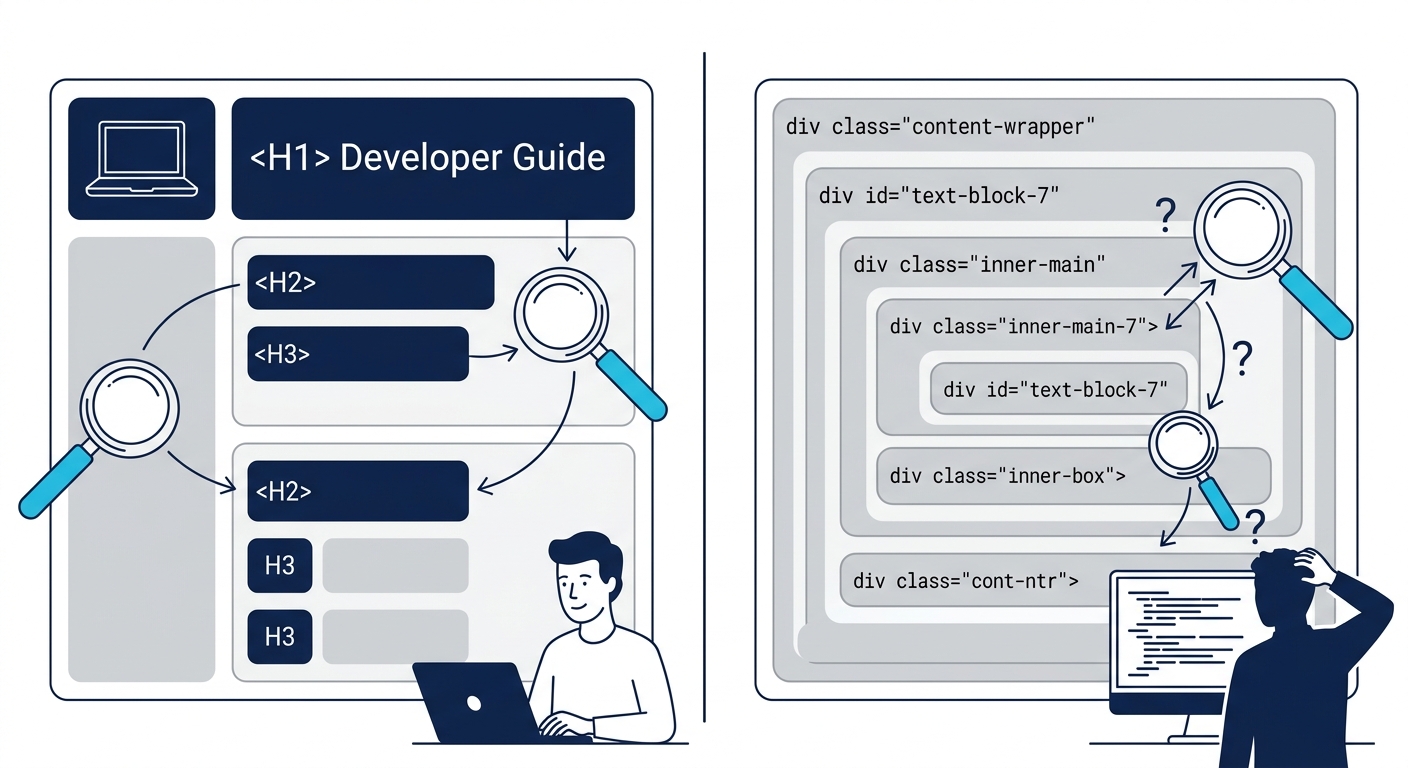
As CoreIT documents, clean and semantic HTML makes it easier for search engines to understand page content and hierarchy, directly improving indexing and ranking. The inverse is equally true: documentation sites built with heavy JavaScript frameworks that render content client-side force Googlebot into a two-phase indexing process. The crawler fetches the initial HTML, finds minimal content, then has to schedule a rendering pass to execute JavaScript and extract the actual documentation text. For large doc sites with thousands of pages, many of those rendering passes never happen. The pages simply don’t get indexed.
Google’s December 2025 rendering update made this worse. Pages returning non-200 HTTP status codes may now be excluded entirely from Googlebot’s rendering pipeline. If a developer docs site returns a soft 404 for an unpublished version’s landing page but uses JavaScript to render a “this version is archived” message with navigation links, Googlebot may never render or see that content.
The fix, again, is an engineering decision: server-side rendering for documentation pages, proper HTTP status codes managed at the application layer, and semantic HTML that communicates page structure without requiring JavaScript execution. Old Moon Digital’s analysis frames it well: isolating the code itself, it generally doesn’t have too much direct ranking impact. But poor code quality leads to slower performance, confusing content for crawlers, and poor accessibility, and those factors do affect rankings meaningfully.
For brands working with a B2B digital marketing agency, this is worth flagging during the technical audit phase. If your product has developer-facing documentation, the agency’s SEO recommendations need to account for how the docs are built, not just what they say.
The CI/CD Pipeline as SEO Infrastructure
Here’s where developer community organic growth diverges most sharply from traditional SEO practice. In a conventional marketing workflow, SEO audits happen periodically. Someone runs Screaming Frog or Sitebulb, generates a report, files tickets, and waits for engineering to prioritize the fixes. In developer communities that take code quality SEO seriously, the audit is automated and continuous. It lives in the CI/CD pipeline.
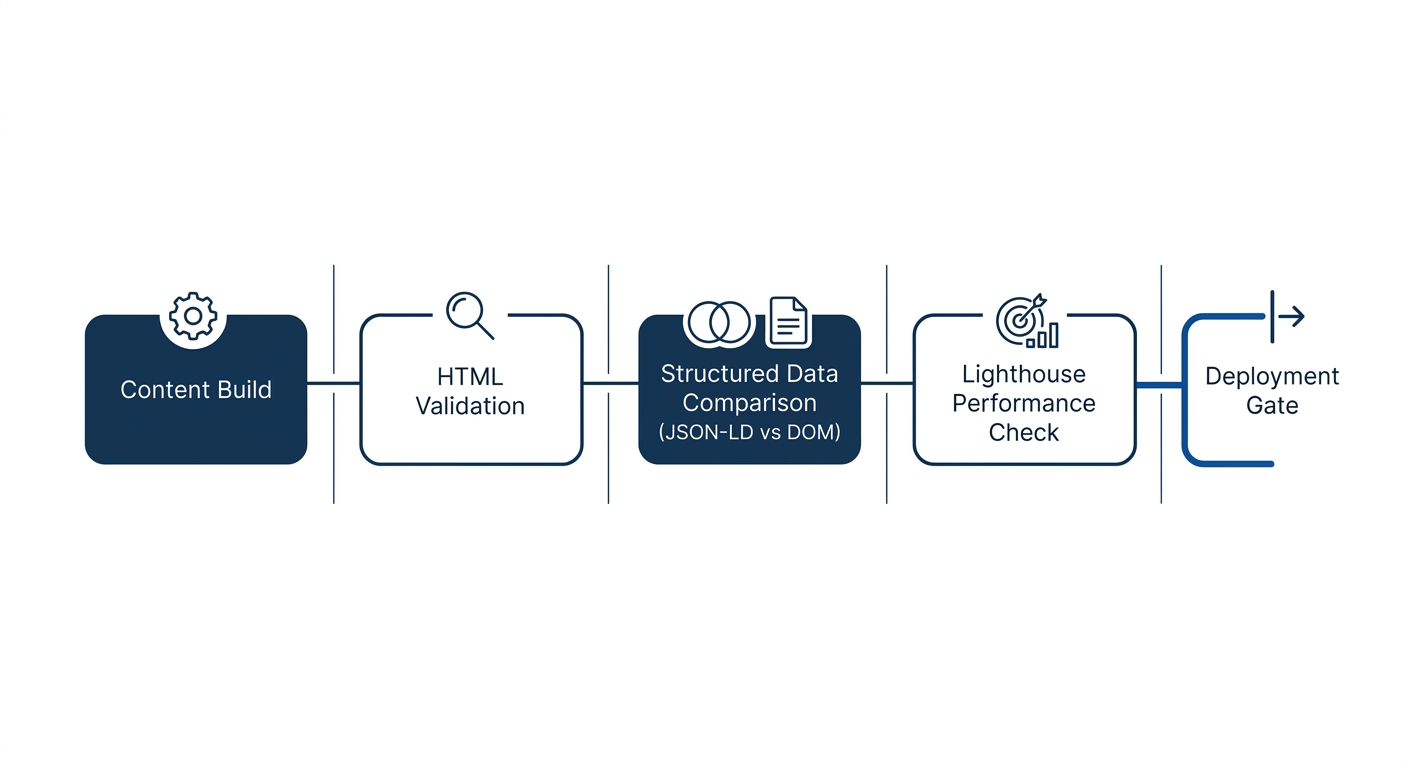
The pattern works like this: before any documentation change merges into production, an automated check validates the SEO-critical elements. Does every page have a unique title tag and meta description? Are canonical tags present and pointing to the correct URL? Does the heading hierarchy follow a logical H1 → H2 → H3 sequence without skipping levels? Is the rendered HTML valid and accessible?
Developer communities that automate SEO validation in their build pipelines catch more technical issues in a week than most marketing teams catch in a quarterly audit.
GitBook’s documentation on SEO techniques recommends treating internal links, metadata, and accessibility as first-class concerns during content authoring, not as post-publication optimizations. For teams using GitBook or similar platforms, many of these checks can be enforced at the platform level. For custom-built documentation sites, the checks need to be written as test suites and integrated into the deployment workflow.
This approach produces a measurable difference in how quickly technical SEO issues get resolved. In a traditional setup, a broken canonical tag might persist for weeks between audit cycles. In a pipeline-integrated setup, the build fails and the broken tag gets fixed before it ever reaches production. Understanding why Core Web Vitals remain a ranking factor is part of this picture: performance metrics like Interaction to Next Paint (INP) degrade when JavaScript-heavy documentation pages ship without optimization, and pipeline-level Lighthouse checks catch those regressions before deployment.
The open-source SEO tool ecosystem reflects this engineering-first mindset. SEOnaut, an open-source audit tool on GitHub, runs its entire crawl engine inside a Docker container, designed to be spun up as part of a local development workflow. Projects like Open-SEO on GitHub take the same approach to keyword and competitor research, providing tools that developers can integrate into their existing workflows rather than requiring a separate marketing platform login.
Tip: If your organization’s developer documentation lives in a separate repository from the main product, make sure the CI/CD pipeline for that repo includes SEO validation steps. Documentation repos are frequently overlooked in technical audits because they’re treated as “content” rather than “code.”
Structured Data and the Schema Drift Problem
Structured data is where the code-quality-as-SEO argument becomes hardest to ignore. Developer documentation sites frequently use JSON-LD to mark up articles, FAQs, how-to guides, and API reference pages. When the structured data is generated dynamically and the page content is also rendered dynamically, the two can fall out of sync. The JSON-LD might declare a page title that doesn’t match the rendered H1. A FAQ schema might list questions that were removed from the visible content three deployments ago.
This mismatch, sometimes called Schema Drift, erodes Google’s trust in the site’s structured data signals. The penalty isn’t dramatic or sudden. Rankings don’t collapse overnight. Instead, the site gradually stops appearing in rich results, loses featured snippet positions, and sees click-through rates decline as its SERP presence becomes less visually distinctive.
The fix is, once again, a testing problem. Developer teams that treat structured data as testable code write validation checks that compare JSON-LD values against the rendered DOM. If the JSON-LD product name doesn’t match the visible product name on the page, the test fails and the deployment stops. This is the same discipline that prevents shipping broken API responses, applied to search engine communication. For teams evaluating which schema format to use, the answer increasingly favors JSON-LD precisely because it’s easier to test programmatically and integrate into automated validation pipelines.
When the Pull Request Becomes the Content Brief
The documented patterns across developer documentation platforms point to a consistent conclusion: for developer communities, organic growth is a byproduct of engineering rigor. The teams that rank well for technical queries aren’t the ones with the most aggressive keyword strategies. They’re the ones whose documentation is clean, fast, semantically correct, and consistently validated against its own structured data.
This matters for Philippine businesses building developer-facing products or maintaining technical documentation for enterprise clients. If you’re evaluating an SEO partner, the conversation about your developer docs should go deeper than “let’s add keywords to the meta descriptions.” The partner should be asking how your docs are built, how they’re deployed, and whether the build pipeline includes any SEO validation. If those questions don’t come up, the engagement is unlikely to address the actual ranking bottlenecks.
The broader pattern is worth watching for any brand with a significant technical audience. Developer communities don’t trust keyword-stuffed content. They trust clean code, accurate documentation, and fast page loads. Those signals—crawlability, semantic correctness, performance, structured data accuracy—are also exactly what search engines reward. For developer-facing brands, code quality and SEO quality converge. The pull request review becomes the most important content quality gate the marketing team never attends but probably should.