The Website Migration SEO Playbook: Pre-Migration Audits, Redirect Mapping, and Post-Launch Traffic Recovery for Enterprise Ecommerce

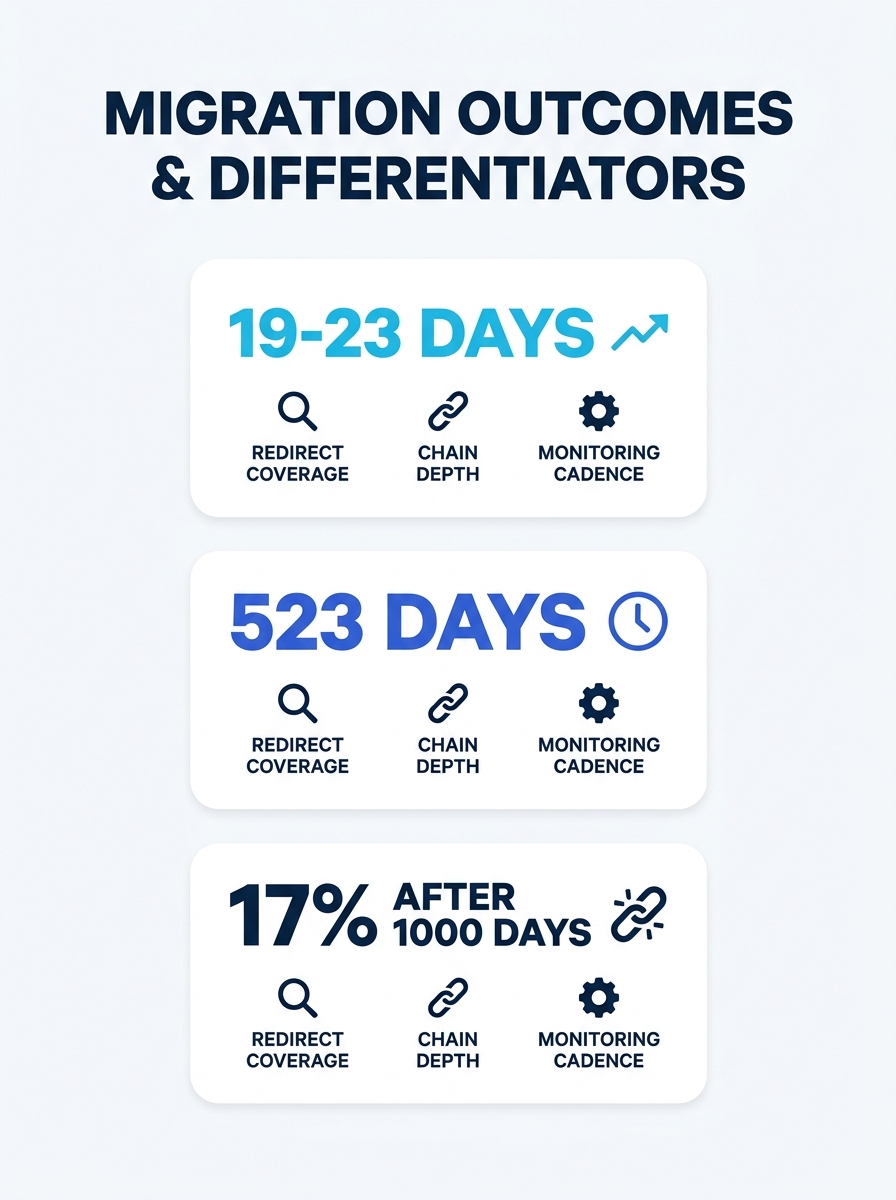
Across 892 tracked domain migrations, the average time to recover pre-migration organic traffic was 523 days, and 17% of those sites never recovered at all, even after 1,000 days of monitoring. For enterprise ecommerce sites where organic search drives a material share of revenue, those numbers define the stakes of every ecommerce website migration SEO decision your team makes.
TL;DR: Enterprise ecommerce migrations fail because redirect maps are incomplete, crawl budget gets wasted on dead URLs, and teams don’t monitor recovery with enough granularity. The fastest recoveries happen in 19–23 days when 1:1 permanent 301 redirects cover every indexed URL, staging environments validate before DNS changes, and daily monitoring runs for at least two weeks post-launch.
Why 523 Days Is the Wrong Baseline
That 523-day average masks two very different populations of migrations. The fastest recoveries, those completed in 19 to 23 days, shared three traits: exhaustive 1:1 redirect coverage, no redirect chains deeper than a single hop, and daily post-launch crawl monitoring. The slowest recoveries, the ones dragging past 1,000 days, almost universally had gaps in redirect mapping that sent Googlebot into loops of 404s and soft redirects.
The distinction matters for how you brief your agency or internal team. A site moving from one platform to another with the same domain and preserved URL structure faces a fundamentally different risk profile than a full domain migration with restructured categories. According to Search Engine Journal, when a migration involves significant structural changes, Google may treat the site as brand new, and rebuilding trust takes proportionally longer.
The expected post-migration traffic dip for a well-executed migration sits between 5% and 15% in the first 30 days, with recovery to 95–100% of baseline by weeks 8 through 12. Anything beyond that window signals an execution problem, not normal algorithmic recalibration.
The Four-Lens Pre-Migration Audit
A technical SEO pre-launch audit for enterprise ecommerce requires four distinct data sources working together. As the ALM Corp crawl budget framework states, “The best crawl budget audits do not begin with opinions. They begin with inventory and evidence.” Those four lenses: Search Console data, server log analysis, a full technical crawl, and template-level URL mapping.
Search Console data reveals which URLs Google actually indexes and sends impressions to. Your crawl tool might surface 200,000 URLs, but Search Console shows you which 40,000 drive clicks. Those 40,000 are your non-negotiable redirect targets.
Server logs expose what Googlebot actually crawls versus what you think it crawls. Enterprise ecommerce sites with faceted navigation routinely generate hundreds of thousands of parameter URLs that consume crawl budget while delivering zero revenue. Identifying these before migration prevents you from carrying crawl budget waste into the new architecture.
A full technical crawl using tools like Screaming Frog or Sitebulb captures every URL, status code, meta tag, canonical, and internal link relationship. Semrush’s migration checklist specifically calls out that “permanent ranking drops and lost traffic aren’t always caused by the migration itself” but by “preventable issues like missing redirects and undetected crawl blocks.”
Template-level URL mapping groups URLs by type (product pages, category pages, blog content, filtered views) so you can apply redirect rules at scale rather than mapping each of 150,000 URLs individually. An Incremys analysis recommends comparing each segment across five dimensions: URL volume generated, expected indexability, crawl signals, page performance including TTFB, and business value.
Tip: Cross-reference Google Analytics conversion data with Search Console impression data before finalizing your redirect priority list. Pages with high impressions but low clicks may be candidates for consolidation rather than 1:1 migration, an opportunity to [fix architectural problems](/blog/enterprise-site-architecture-seo-organic-revenue) you’ve been carrying for years.
301 Redirect Strategy for Enterprise Sites
The redirect map is where enterprise ecommerce migrations succeed or fail. A 1:1 approach, mapping every old URL to its exact equivalent on the new platform, is the standard recommendation across every credible source, and for good reason. Each unmapped URL that returns a 404 leaks link equity that took years to accumulate.
Three rules govern redirect execution at enterprise scale:
Use permanent redirects exclusively. 301 or 308 redirects forward link equity. Temporary redirects (302, 303, 307) do not. A single misconfigured redirect type on a high-authority category page can suppress ranking for that entire product vertical.
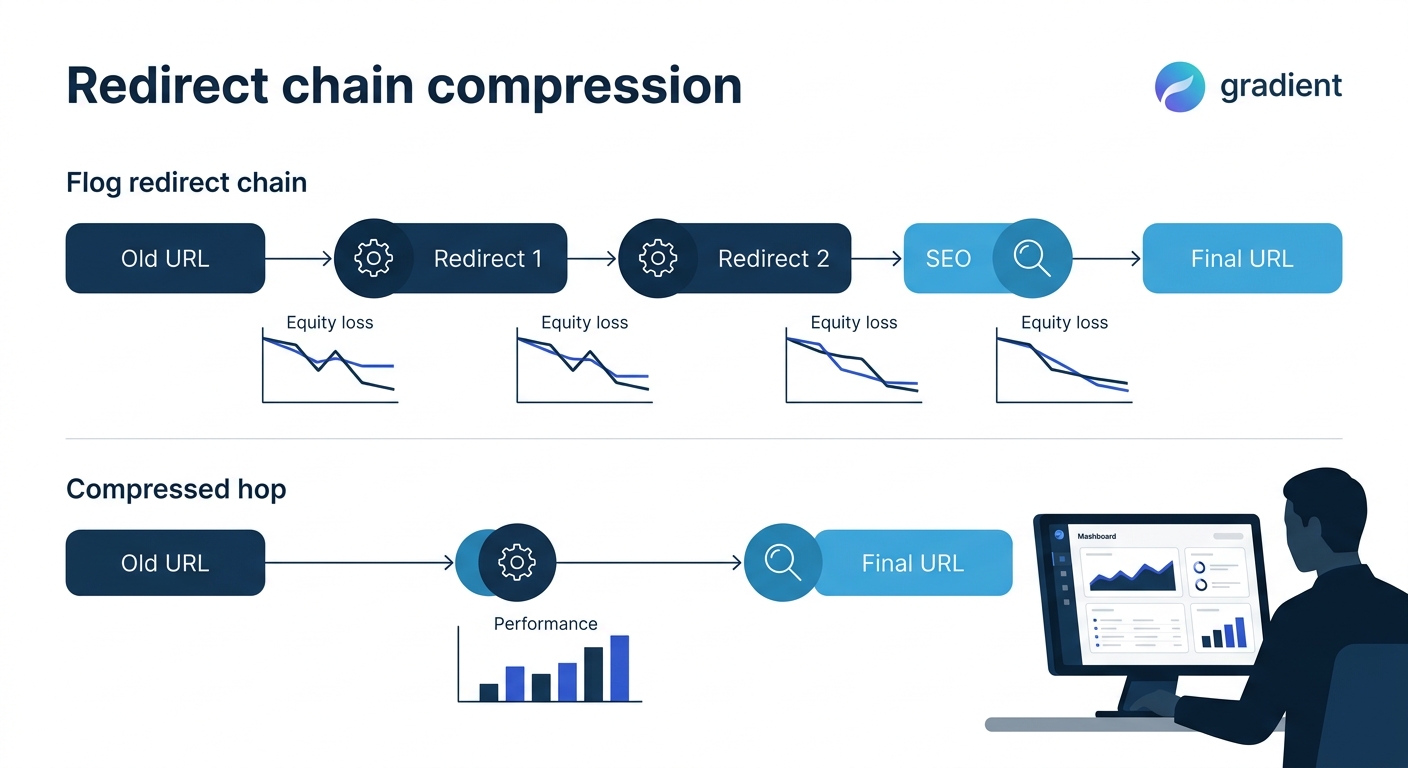
Compress redirect chains to a single hop. If your old site already had redirects in place from previous URL changes, discontinued products, or past migrations, the new redirect map needs to point from the original source URL directly to the final destination. Chaining three or four redirects together dilutes authority at each hop and increases crawl latency.
Test in staging before DNS changes. Export the old site’s complete URL structure, map each URL to its new equivalent, and validate the entire map in a staging environment before going live. Password-protect and noindex the staging site. At launch, remove those staging blocks and rewrite all canonical tags to the live hostname.
| Migration Type | Redirect Complexity | Typical Recovery Window | Primary Risk |
|---|---|---|---|
| Platform change, same domain, same URLs | Low (server-level config only) | 2–4 weeks | Canonical tag conflicts between old and new platform |
| Platform change, same domain, new URL structure | High (full 1:1 redirect map) | 4–12 weeks | Incomplete redirect coverage on long-tail product pages |
| Full domain migration | Very high (redirects + Change of Address) | 8–16 weeks | Google treats site as new; 180-day signal forwarding limit |
| Domain migration + URL restructure | Maximum (combined complexity) | 12–24+ weeks | Compounds both risks; 17% non-recovery rate concentrates here |
Domain Migration Crawl Budget Optimization
Enterprise ecommerce sites running 100,000+ indexed pages face a specific crawl budget problem during migration. Google allocates a finite crawl budget to each domain, and during a migration, that budget must cover both old URLs (to discover the redirects) and new URLs (to index fresh content). If your pre-migration site was already wasting crawl budget on non-revenue URLs like parameter pages, internal search results, and out-of-stock product variants, the migration amplifies that waste.
The practical move is to clean up crawl waste before migration, not during. Audit your robots.txt, your noindex directives, and your canonical tag structure on the current site first. Migrate a clean site rather than migrating a messy one and hoping to fix it after launch.
For domain-level moves, file a Change of Address request in Google Search Console. The signal-forwarding window is limited to 180 days, which means Google stops associating the old domain’s authority with the new one after six months. Any redirect that isn’t discovered and processed within that window loses its equity-forwarding value permanently.
Search Engine Land’s migration guidance recommends a sequenced approach: “Launch content updates first, let search engines process those changes, then tackle design and technical modifications.” This phased rollout gives you clear diagnostic signals when rankings shift because you can attribute changes to specific phases rather than guessing which of twenty simultaneous changes caused a drop.
Post-Migration Organic Traffic Recovery
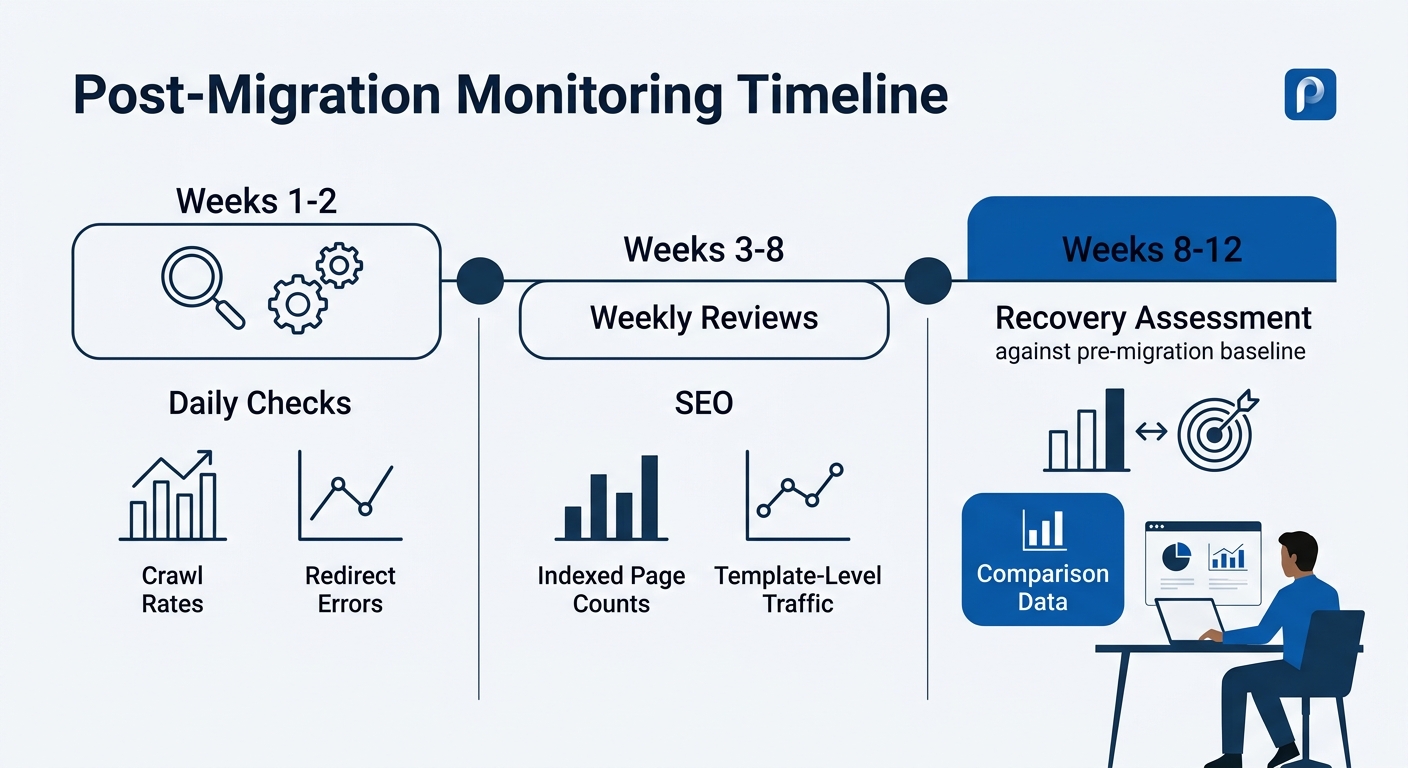
Recovery monitoring requires a defined cadence. Daily checks for weeks one and two, weekly reviews through month three. And the metrics that matter most in the first 48 hours are different from the ones that matter in week six.
Days 1–3: Watch server logs for Googlebot crawl rate on the new URLs. Confirm redirects are being followed correctly. Check Search Console’s Coverage report for spikes in “Crawled — currently not indexed” or “Page with redirect” errors. Submit your XML sitemap containing only the new URLs to Search Console immediately.
Days 4–14: Monitor indexed page counts in Search Console. If indexed pages are declining without a corresponding increase in redirected-URL counts, redirects are failing somewhere. Use the URL Inspection tool on your highest-traffic pages to confirm Google sees the correct canonical.
Weeks 3–8: Organic traffic should begin stabilizing. Compare weekly traffic against your pre-migration baseline at the page-template level, not site-wide. A site-wide number that looks flat can mask a 40% drop in category page traffic offset by a spike in homepage visits from branded searches.
Weeks 8–12: If post-migration organic traffic recovery hasn’t reached 90%+ of baseline by this point, Moz’s migration recovery guide recommends submitting lost-traffic pages for manual recrawling through Search Console and beginning outreach to authoritative sites linking to old URLs so they can update their links directly.
The 523-day average recovery time includes migrations that were never going to succeed because they launched with incomplete redirect maps. With full 1:1 coverage and daily monitoring, the realistic recovery window for enterprise ecommerce is 8 to 12 weeks.
AI Visibility Preservation During Migration
A migration that recovers traditional organic rankings but loses visibility in AI Overviews and answer engines leaves real revenue on the table. Structured data (product schema, FAQ schema, breadcrumb markup) needs to survive the migration intact. Any schema that referenced old URLs via canonical or sameAs properties must be updated to reflect new URLs at launch.
Brands already investing in Generative Engine Optimization should treat AI citation preservation as a distinct migration KPI. AI retrieval systems pull from structured content blocks and well-attributed data. If your migration strips schema markup or breaks the semantic relationships between product pages and category pages, you’ll lose AI visibility even if traditional rankings recover. The same principles that govern building information architecture for compounding organic growth apply with extra urgency during a migration, because every broken internal link and orphaned page degrades the semantic graph that AI systems depend on.
What The Data Doesn’t Tell Us
The 523-day average and the 17% non-recovery rate tell us about outcomes, but they don’t isolate causation cleanly. We don’t know how many of those 892 tracked migrations involved simultaneous redesigns, content overhauls, or platform changes that compounded variables. We don’t know the baseline site health before migration. A site already carrying significant technical debt responds differently than a clean one, and the audit ticket count before migration almost certainly correlates with recovery time in ways the aggregate data doesn’t segment.
The 19-to-23-day fastest-recovery cohort is the more useful benchmark, but it raises its own questions. Were those sites smaller, with fewer URLs to redirect? Were they on the same domain with preserved URL structures? The data doesn’t break down by site scale or migration type in enough detail to draw enterprise-specific conclusions with full confidence.
What the data does confirm is directional: complete redirect coverage, compressed chains, staged validation, and disciplined post-launch monitoring separate recoveries measured in weeks from recoveries measured in years. The migration itself is a controlled event. The variables that determine whether you land in the 19-day cohort or the 523-day cohort are decisions your team makes before the DNS switch, and those decisions deserve the same rigor and budget as the platform build itself.